Dealership Applications
A dealership application is just a contact record (res.partner) with dealer_application=True. The Dealer Dev menu filters the global contact list down to these records so UAAGI doesn't have to scroll past every supplier and customer in the system.
MSD Administrators, Dealer Dev Managers, Dealer Dev Users.
Opening the list
Dealer Dev ▸ Dealership
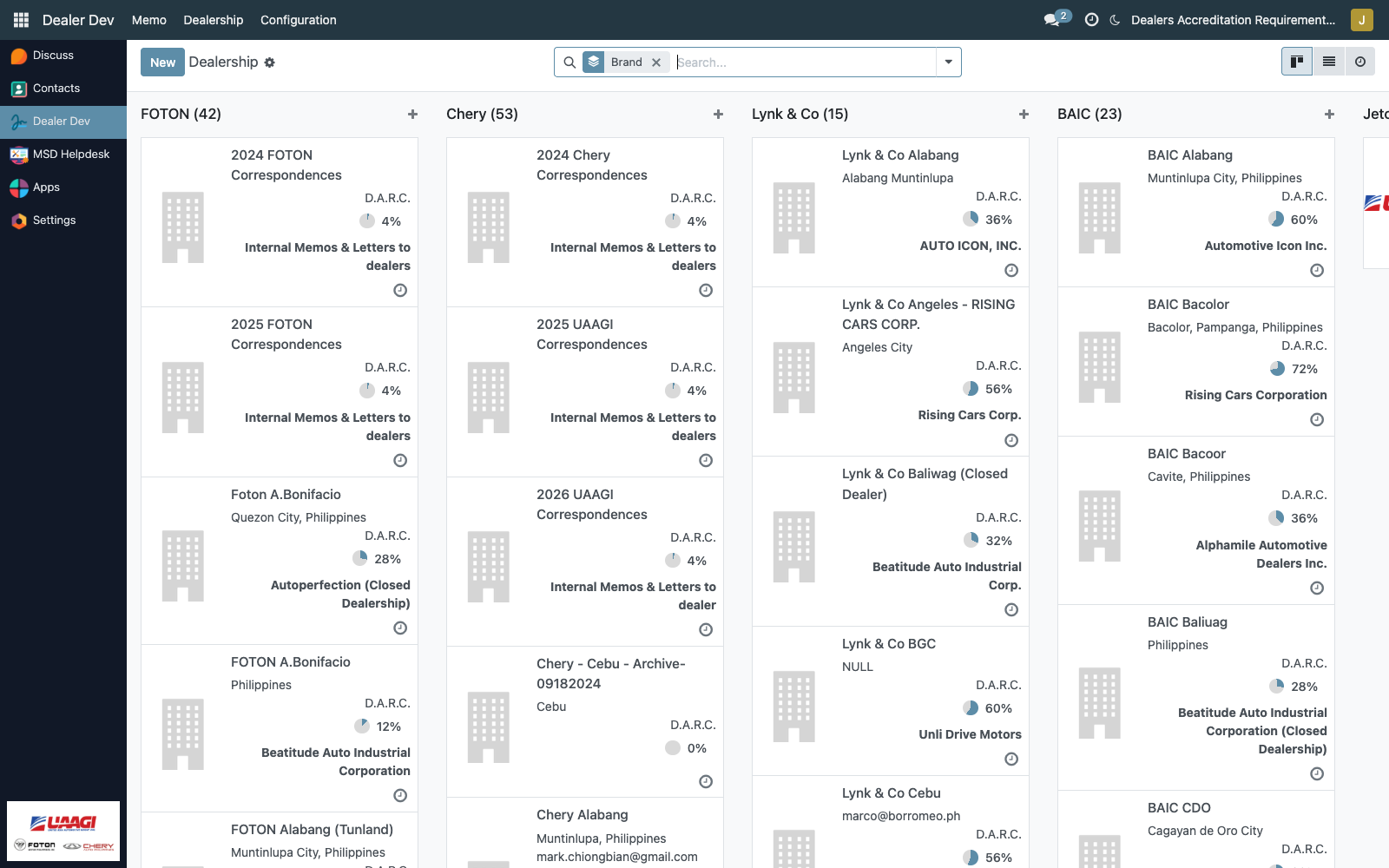
The list opens in kanban by default, grouped by brand (via search_default_group_brand). Each card shows:
- The applicant company name (the standard partner name).
- Brand as the grouping column.
- The D.A.R.C. compliance pie — a percentage widget computed from ticked-off requirements.
- The Dealer Name (
dealer_alias) — usually a short local name distinct from the registered business name.
List and form views are also available via the view switcher.
Creating an application
Click New. Because the action sets default_dealer_application=True and default_application_state='processing', the form is already in "dealership application mode" — the standard Contacts notebook is hidden, and the dealer-specific fields are shown instead.
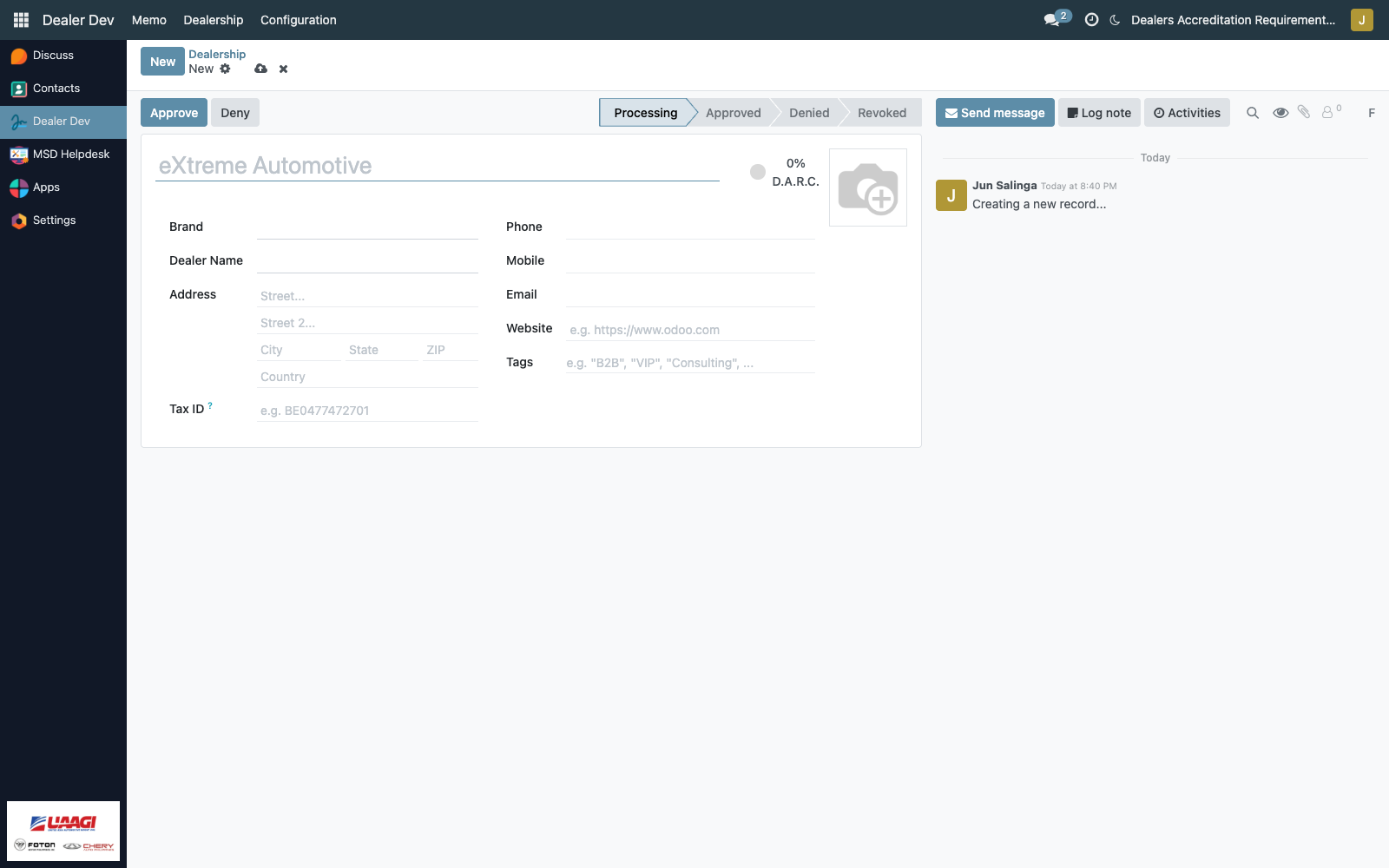
The fields that matter
| Field | Required | Notes |
|---|---|---|
| Company Name | Yes | The registered legal name. Placeholder suggests eXtreme Automotive. |
Brand (brand_id) | Yes when dealer_application=True | Links to the brand catalog. |
Dealer Name (dealer_alias) | Yes when dealer_application=True | The short name displayed on the kanban card. |
| Address, Phone, Email, Website, TIN | No | Standard partner fields. |
Status (application_state) | Yes, defaults to Processing | Shown as a statusbar in the form header. |
The standard Contacts Individual vs Company toggle and the Contacts & Addresses / Internal Notes / Sales & Purchase notebook are hidden for dealer-application records — they add noise that isn't relevant here.
The status flow
The header statusbar has four positions: Processing → Approved / Denied → Revoked.

Four buttons drive transitions:
| Button | Visible when | Action |
|---|---|---|
| Approve | state is processing | sets state to approved |
| Deny | state is processing | sets state to denied |
| Re-process | state is denied or revoked | sets state back to processing |
| Revoke | state is approved | sets state to revoked |
Each button opens a confirmation dialog so UAAGI doesn't flip status with a stray click. There is no email, no audit beyond the chatter, and no downstream system that reacts to the change — the state is UAAGI's own bookkeeping.
The D.A.R.C. checklist
The compliance stat button on the form avatar and the pie on the kanban card both link to the dealer's DARC tab.
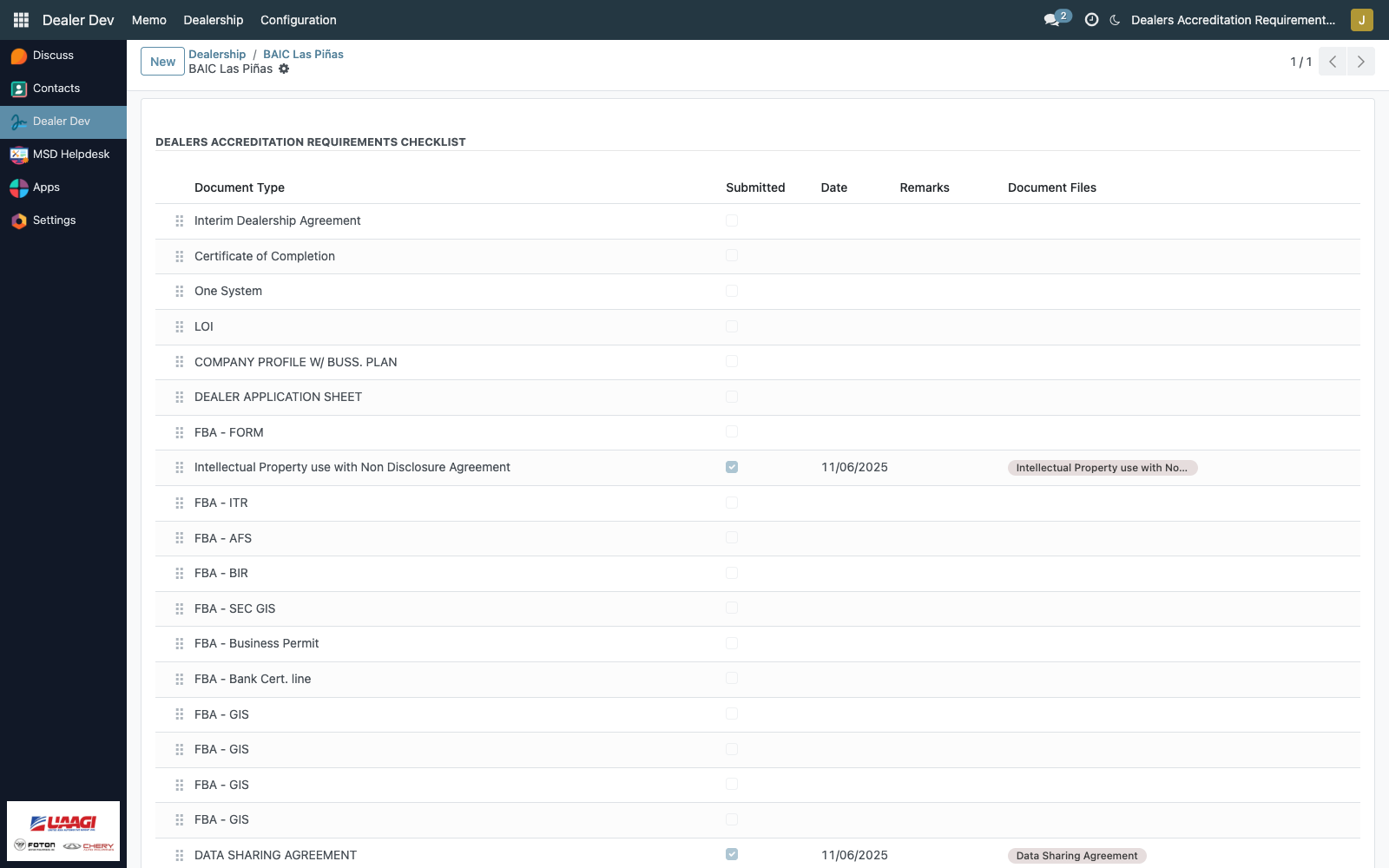
Each row corresponds to one active requirement:
| Column | Purpose |
|---|---|
| seq (handle widget) | Drag to reorder — mirrors the sequence on the master requirement. |
Document Type (dar_id) | The requirement (read-only on the checklist). |
| Submitted | Checkbox. Ticking it counts toward the compliance percentage. |
| Date | When the document was submitted. |
| Remarks | Free-text notes. |
| Document Files | The attached PDFs (many2many tags — each tag is one PDF). |
Clicking a row opens the inline form with a Documents section where files are shown with the pdf_viewer widget — UAAGI can scroll the PDF directly inside the form without downloading.

How the checklist fills itself
UAAGI never manually adds the 16 checklist rows. They appear the first time either of these happens:
- The partner form's compliance percentage is recomputed (triggered by opening the form or refreshing).
- The Compliance stat button is clicked (
show_darc()action on the partner).
Both paths run the same logic:
# from res_partner.py
for darc in env['dealers.accreditation.requirements'].search([], order='seq'):
    if not checklist_exists_for(partner, darc):
        create_checklist_row(partner, darc, seq=darc.seq)
This means changes to the DARC Requirements master propagate automatically — add a new requirement today, and every existing dealer partner gets a fresh checklist row the next time their form opens. Deactivating a requirement (setting active=False) stops it from counting toward the compliance percentage but leaves historical checklist rows intact.
Compliance percentage
Computed on every read as:
dar_compliance_percentage = submitted_count / total_active_requirements × 100
Where:
submitted_count= number of checklist rows wheresubmitted=TrueAND the linked requirement isactive=Truetotal_active_requirements= total active rows indealers.accreditation.requirements
Inactive requirements are excluded from both the numerator and denominator — a retired requirement does not penalize nor credit existing dealers.
The result renders as a percentpie widget on:
- The kanban card (so UAAGI can scan compliance at a glance).
- The partner form avatar (so the exact % is visible on the open record).