Keycloak SSO Administration
This section covers the setup and administration of Keycloak as the Single Sign-On (SSO) identity provider for the UAAGI UNO platform.
These guides are written for system administrators responsible for provisioning and maintaining the Keycloak server, realms, clients, and user accounts.
Architecture overview
The UAAGI UNO platform uses Keycloak to provide centralized authentication across all Odoo 18 instances:
                        ┌─────────────────────┐
                        │   Keycloak SSO       │
                        │ sso.uaagi-uno.com    │
                        │                      │
                        │ Realm:               │
                        │ uaagi-dealerships    │
                        └──────────┬───────────┘
                                   │
                    ┌──────────────┼──────────────┐
                    │              │              │
              ┌─────▼─────┐ ┌─────▼─────┐ ┌─────▼─────┐
              │  Portal   │ │ Dealer A  │ │ Dealer B  │
              │ portal.   │ │ makati.   │ │ cebu.     │
              │ uaagi-uno │ │ uaagi-uno │ │ uaagi-uno │
              │ .com      │ │ .com      │ │ .com      │
              └───────────┘ └───────────┘ └───────────┘
- Portal (
portal.uaagi-uno.com) — the SSO-authenticated entry point. Users log in once and select a dealership. - Dealership instances — each dealer branch has its own Odoo 18 instance. Users are auto-authenticated via the shared Keycloak session (no re-login).
Authentication flow
All instances use OAuth 2.0 Authorization Code flow with PKCE (S256):
- User visits the Portal or a Dealership URL.
- Odoo redirects to Keycloak with a
code_challenge. - User authenticates in Keycloak (or is auto-authenticated if a session exists).
- Keycloak redirects back with an authorization
code. - Odoo exchanges the code +
code_verifierfor tokens (access, ID, refresh). - Odoo reads user claims from the token/userinfo endpoint and provisions the user.
Keycloak server
| Detail | Value |
|---|---|
| Admin Console | https://sso.uaagi-uno.com/admin |
| Realm | uaagi-dealerships |
| Portal Client ID | portal-odoo |
| PKCE Method | S256 |
Custom token claims
Keycloak maps these user attributes into OAuth tokens via protocol mappers:
| Claim | Purpose | Example value |
|---|---|---|
allowed_dealerships | Dealerships the user can access (multivalued) | makati-dealership,cebu-dealership |
primary_dealership | Default dealership | makati-dealership |
employee_id | UAAGI employee ID | UAAGI-2024-001 |
region | User's region assignment | metro-manila |
department | User's department | sales |
The end result
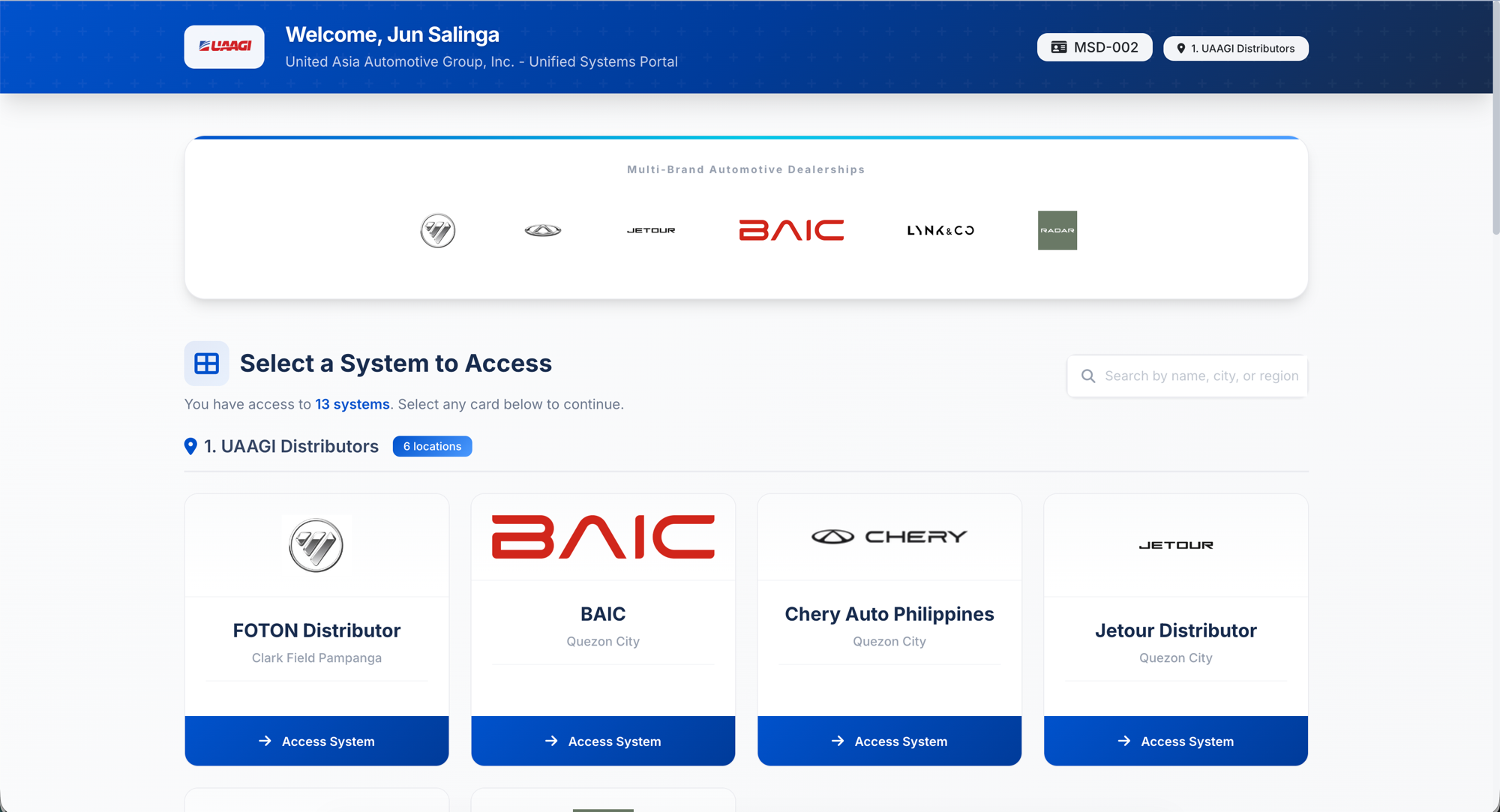
After SSO is configured, users log in once through Keycloak and land on the Dealership Portal — a branded selector page showing all dealerships they have access to, grouped by region. Clicking a card auto-authenticates them on that dealership's Odoo instance.
Guides
- Realm Setup — Create and configure the
uaagi-dealershipsrealm. - Portal Client — Set up the
portal-odooOAuth client with PKCE. - Protocol Mappers — Configure custom attribute-to-claim mappings.
- Dealership Clients — Create per-dealership OAuth clients.
- User Management — Provision users and assign dealership access.
- Odoo Configuration — Configure the Odoo side (OAuth provider, system parameters).
- Testing & Troubleshooting — Verify the SSO flow and resolve common issues.