Dealership Clients
Each dealership branch (e.g. Bacolod, Makati, Cebu) gets its own Keycloak client. This allows each Odoo instance to authenticate independently while sharing the same SSO session.
:::info Portal client vs dealership clients
The Portal client (portal-odoo) is covered in the Portal Client guide. This page covers the per-dealership clients that each Odoo dealership instance uses.
:::
Step 1: Create the client
- Navigate to Clients in the sidebar.
- Click Create client.
- Fill in:
| Field | Value | Example |
|---|---|---|
| Client type | OpenID Connect | Always OIDC for Odoo |
| Client ID | <dealership-code>-dealership | bacolod-dealership |
| Name | UAAGI <City> Dealership | UAAGI Bacolod Dealership |
| Description | Brand list | Multi-brand dealership: FOTON, Chery, Jetour, BAIC, Lynk & Co, RADAR |
- Click Next, then Save.
:::caution Client ID naming convention
The Client ID must match the keycloak_client_id field on the corresponding uaagi.dealership record in Odoo. This is how Odoo maps the allowed_dealerships token claim to dealership records.
:::
Step 2: Settings tab — General & Access settings
Open the newly created client and navigate to the Settings tab.
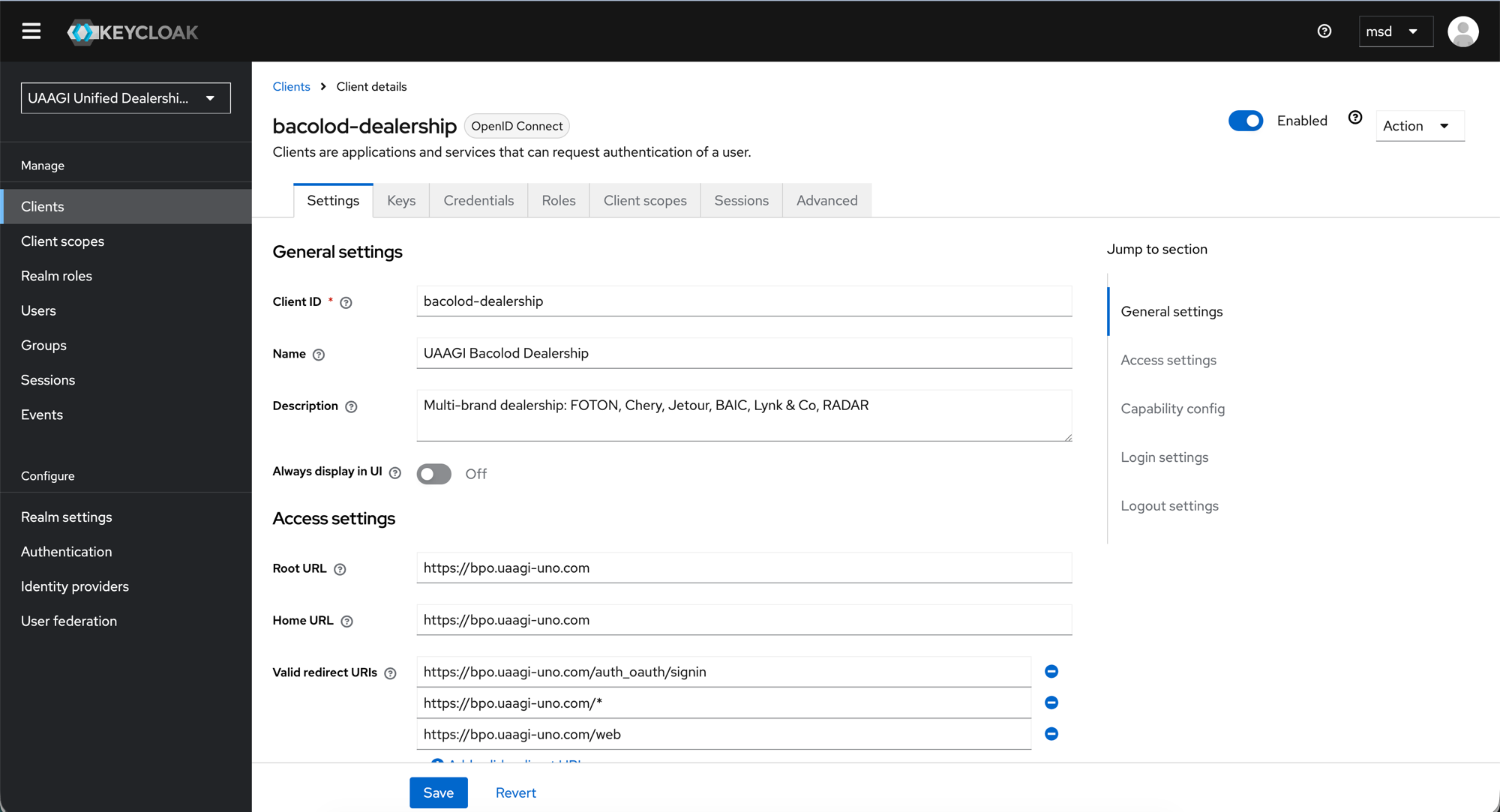
General settings
| Field | Value |
|---|---|
| Always display in UI | Off |
Access settings
| Field | Value | Notes |
|---|---|---|
| Root URL | https://<subdomain>.uaagi-uno.com | The dealership's Odoo instance URL |
| Home URL | https://<subdomain>.uaagi-uno.com | Same as Root URL |
| Valid redirect URIs | See table below | Where Keycloak is allowed to redirect after login |
Valid redirect URIs (add all three):
| URI | Purpose |
|---|---|
https://<subdomain>.uaagi-uno.com/auth_oauth/signin | Odoo's OAuth callback endpoint |
https://<subdomain>.uaagi-uno.com/* | Wildcard fallback |
https://<subdomain>.uaagi-uno.com/web | Direct web access |
Step 3: Settings tab — Post-logout, Web origins & Capability config
Scroll down on the Settings tab.
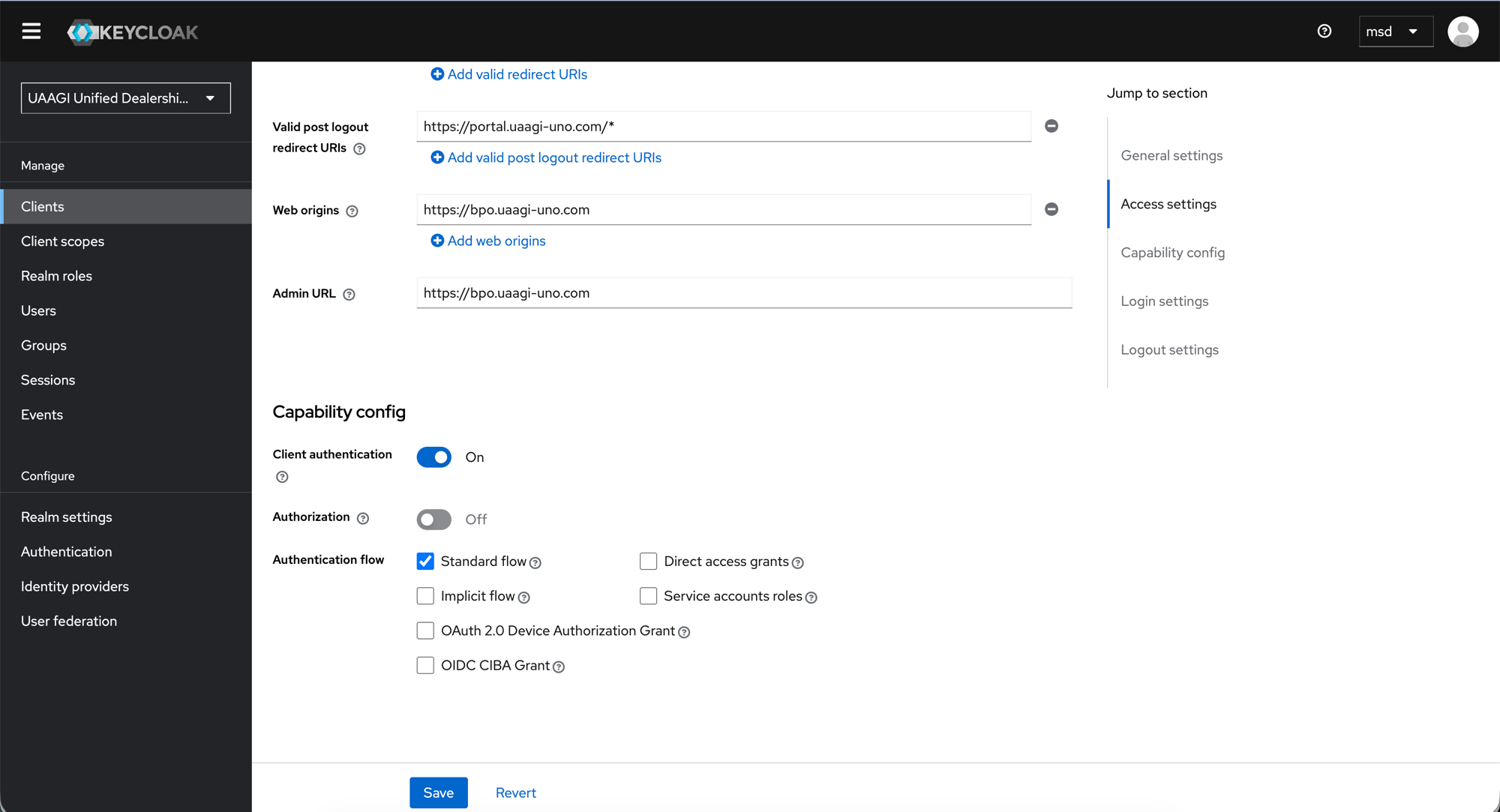
Post-logout redirect URIs
| URI | Purpose |
|---|---|
https://portal.uaagi-uno.com/* | Allows logout to redirect back to the portal |
:::warning Portal URI is required
Without https://portal.uaagi-uno.com/* in the post-logout redirect URIs, users will see an "Invalid redirect" error when logging out from a dealership and being sent back to the portal.
:::
Web origins & Admin URL
| Field | Value |
|---|---|
| Web origins | https://<subdomain>.uaagi-uno.com |
| Admin URL | https://<subdomain>.uaagi-uno.com |
Capability config
| Setting | Value | Notes |
|---|---|---|
| Client authentication | On | This is a confidential client (has a secret) |
| Authorization | Off | Not using Keycloak's fine-grained authorization |
| Standard flow | Checked | Authorization Code flow — required for Odoo |
| Implicit flow | Unchecked | Not used |
| Direct access grants | Unchecked | No password-grant logins |
| Service accounts roles | Unchecked | Not a machine-to-machine client |
| OAuth 2.0 Device Authorization Grant | Unchecked | |
| OIDC CIBA Grant | Unchecked |
Step 4: Login & Logout settings
Still on the Settings tab, scroll to the bottom.
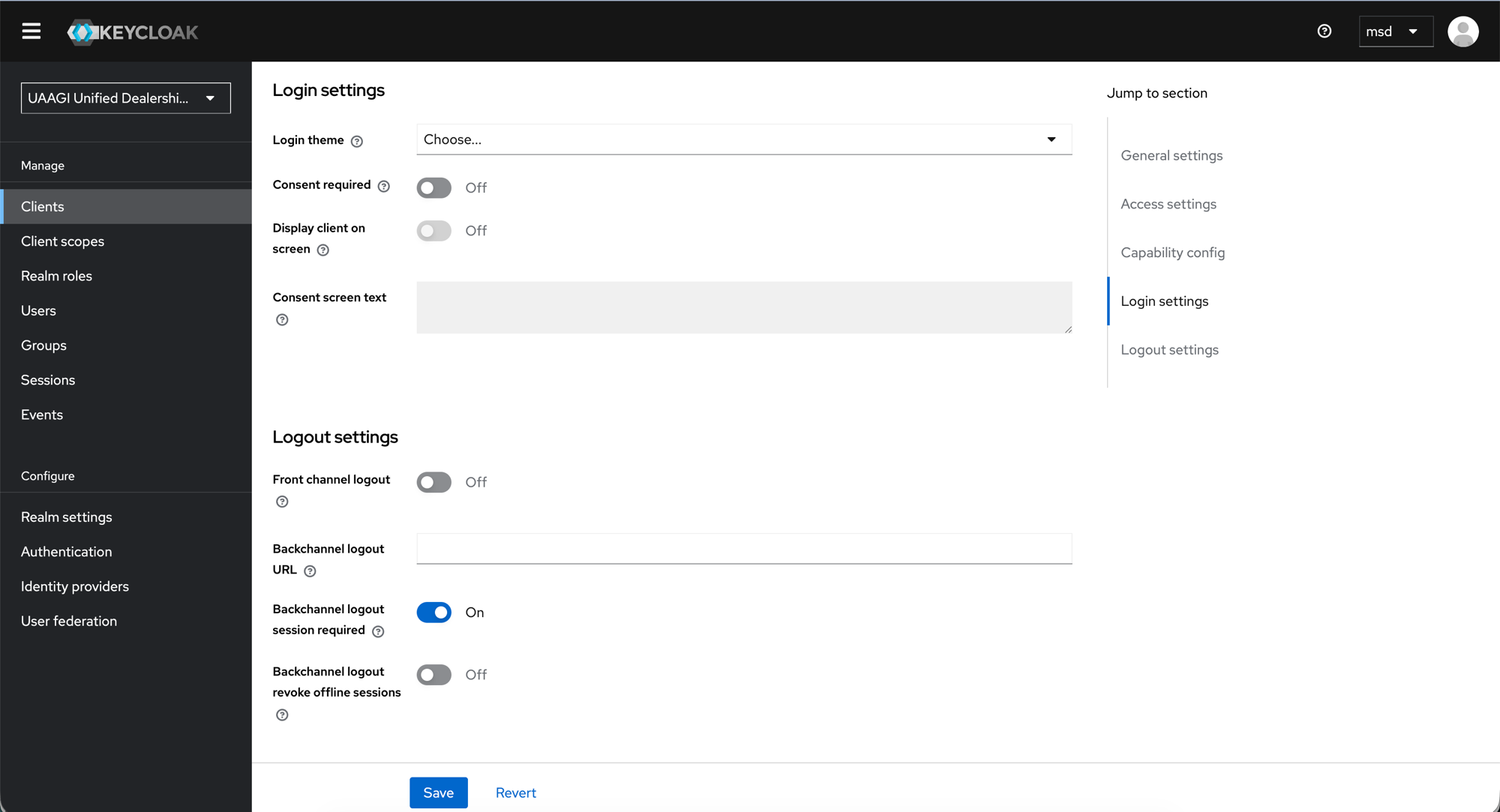
Login settings
| Setting | Value |
|---|---|
| Login theme | (default — Choose...) |
| Consent required | Off |
| Display client on screen | Off |
Logout settings
| Setting | Value | Notes |
|---|---|---|
| Front channel logout | Off | Odoo handles logout via redirect, not front-channel |
| Backchannel logout URL | (empty) | Not configured — Odoo uses redirect-based logout |
| Backchannel logout session required | On | Default, ensures session context in backchannel calls |
| Backchannel logout revoke offline sessions | Off | No offline tokens in use |
Click Save.
Step 5: Credentials tab
Navigate to the Credentials tab.
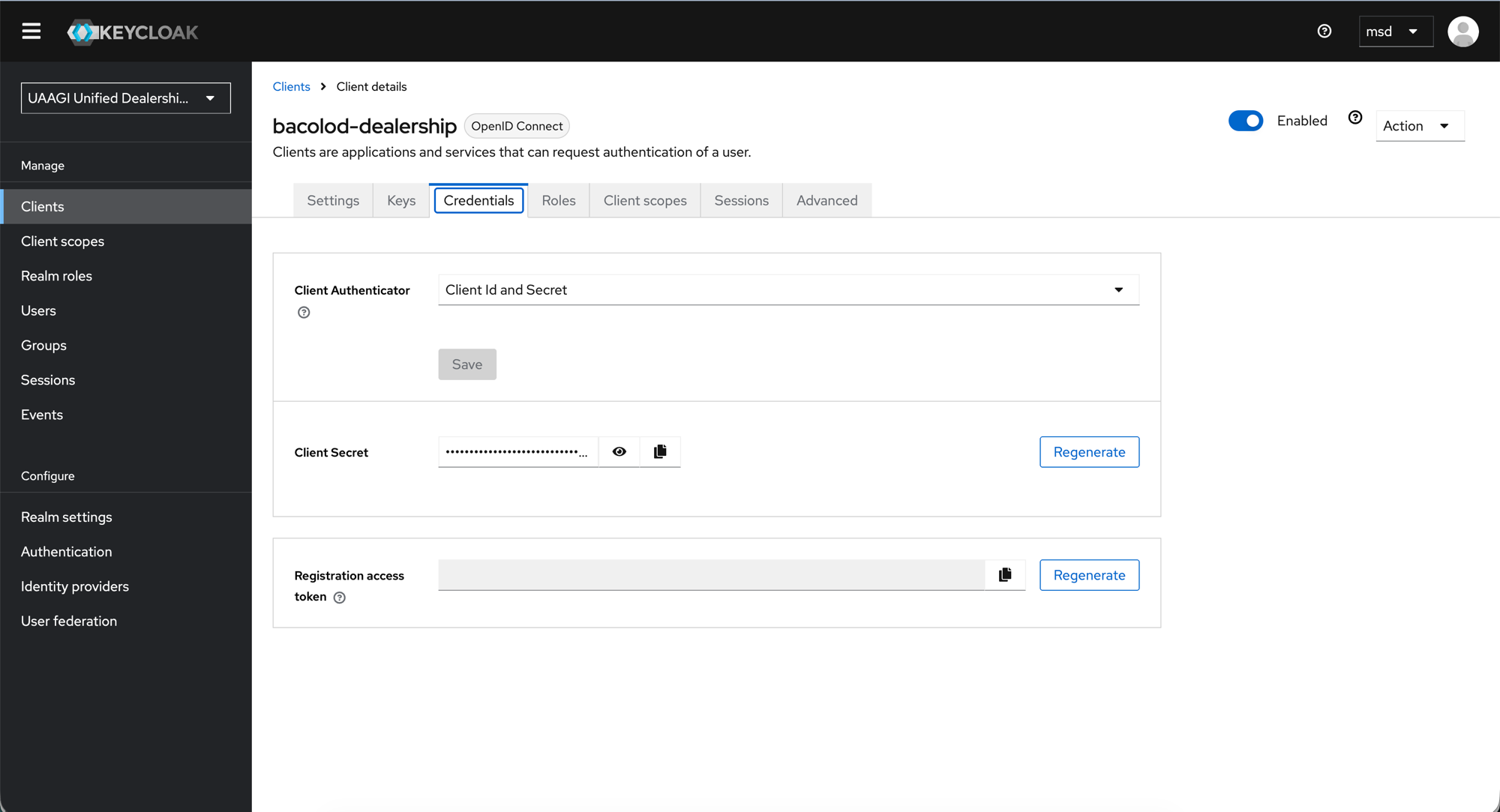
| Field | Value |
|---|---|
| Client Authenticator | Client Id and Secret |
| Client Secret | Auto-generated — click the copy icon to copy |
:::danger Keep the secret secure Copy the Client Secret and store it securely. You will need it when configuring the OAuth provider in Odoo (see Odoo Configuration). Never commit secrets to version control. :::
To rotate a compromised secret, click Regenerate and update the corresponding Odoo OAuth provider record immediately.
Step 6: Advanced tab — PKCE
Navigate to the Advanced tab, then scroll to the Advanced settings section.
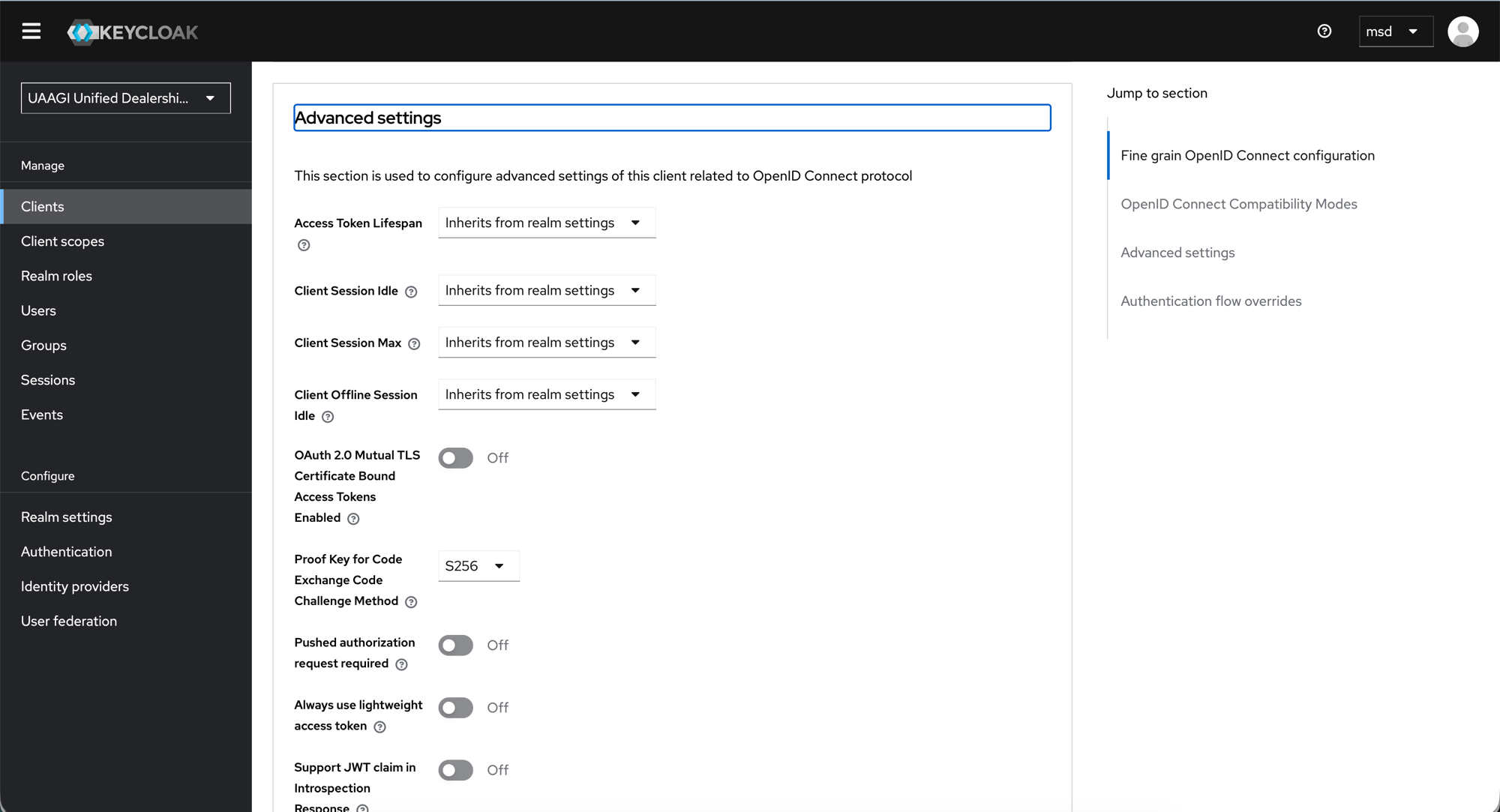
| Setting | Value | Notes |
|---|---|---|
| Access Token Lifespan | Inherits from realm settings | Uses the realm's 30-minute default |
| Client Session Idle | Inherits from realm settings | |
| Client Session Max | Inherits from realm settings | |
| Client Offline Session Idle | Inherits from realm settings | |
| Proof Key for Code Exchange Code Challenge Method | S256 | Required — enables PKCE |
:::warning PKCE must be S256
The Odoo uaagi_dealership_portal module generates PKCE code_challenge / code_verifier pairs using SHA-256. If this is not set to S256, the authorization code exchange will fail with an invalid_grant error.
:::
All other Advanced settings should remain at their defaults (Off).
Click Save.
Repeat for each dealership
Create a client for every dealership branch in the system. The naming convention is:
<city-or-code>-dealership
Examples: makati-dealership, cebu-dealership, davao-dealership, bacolod-dealership
Each client follows the exact same configuration — only the Client ID, Name, Description, and URLs change.
:::tip Bulk provisioning
For large deployments, the uaagi_keycloak_setup.py script in the uaagi_dealership_portal module can automate client creation via the Keycloak Admin REST API.
:::
Quick checklist
Use this checklist when adding a new dealership client:
- Client type: OpenID Connect
- Client ID matches Odoo's
keycloak_client_id - Root URL / Home URL set to dealership's Odoo URL
- Valid redirect URIs include
/auth_oauth/signinand/* - Post-logout redirect URIs include
https://portal.uaagi-uno.com/* - Client authentication: On (confidential)
- Standard flow: checked (only)
- PKCE: S256
- Client secret copied to Odoo OAuth provider record
What's next
- Protocol Mappers — configure the custom attribute mappings that send dealership assignments in the token
- User Management — create users and assign them to dealerships