Protocol Mappers
Protocol mappers tell Keycloak to include custom user attributes as claims in the OAuth tokens. Without them, Keycloak tokens only contain standard claims (email, name, sub). Odoo reads these custom claims to determine which dealerships a user can access, their employee ID, region, and department.
Where to find them
Protocol mappers live under a client's dedicated scope. Navigate to:
Clients > portal-odoo > Client scopes tab > portal-odoo-dedicated
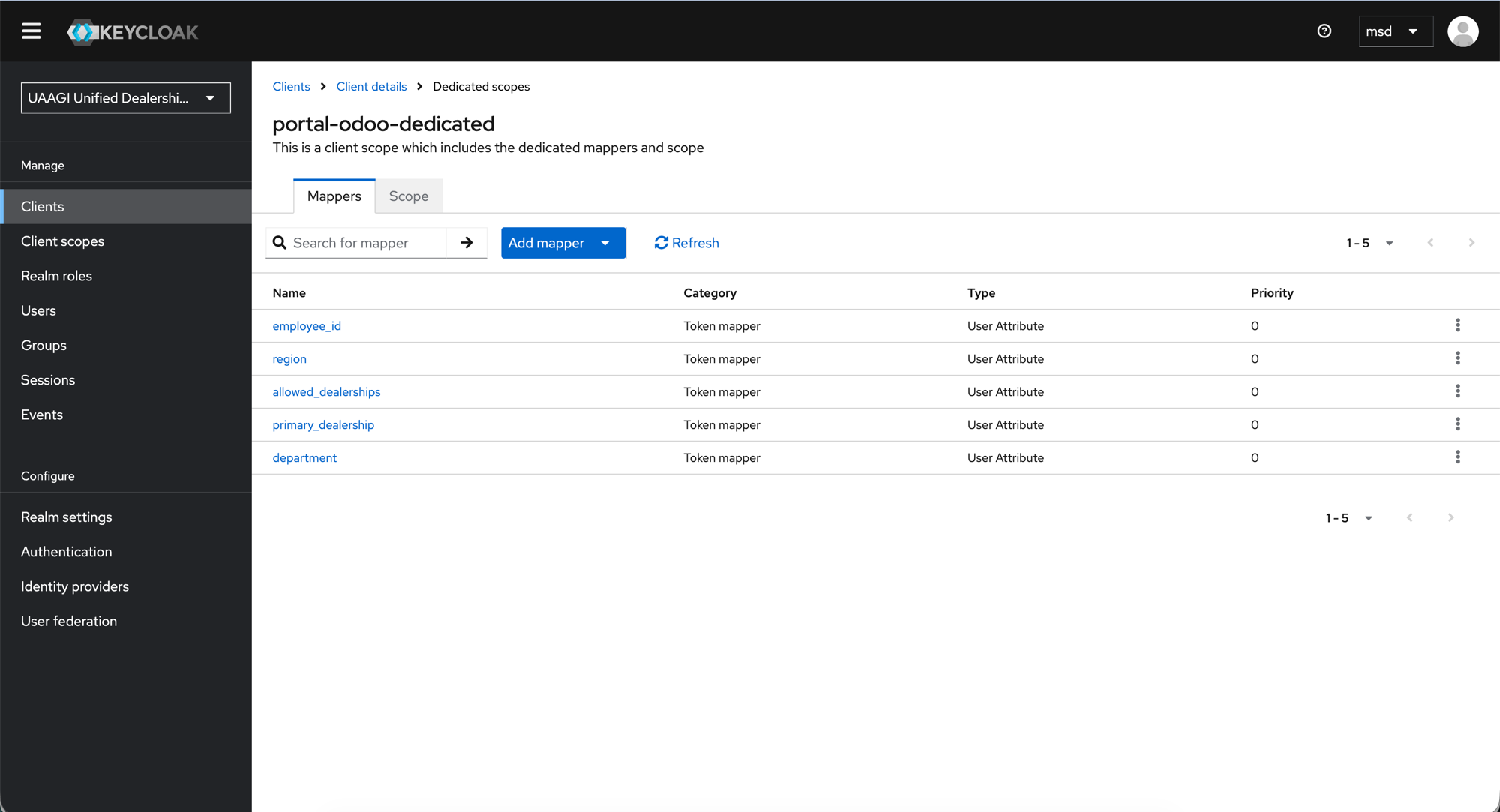
The portal-odoo-dedicated scope shows all 5 custom mappers:
| Name | Category | Type | Purpose |
|---|---|---|---|
employee_id | Token mapper | User Attribute | UAAGI employee ID |
region | Token mapper | User Attribute | User's assigned region |
allowed_dealerships | Token mapper | User Attribute | Dealerships the user can access (multivalued) |
primary_dealership | Token mapper | User Attribute | User's default dealership |
department | Token mapper | User Attribute | User's department |
All mappers share the same type: User Attribute — meaning they read a value from the user's attribute list and inject it into the token.
Creating a mapper
- Click Add mapper > By configuration > User Attribute.
- Fill in the form fields as described below.
- Click Save.
Mapper detail: allowed_dealerships
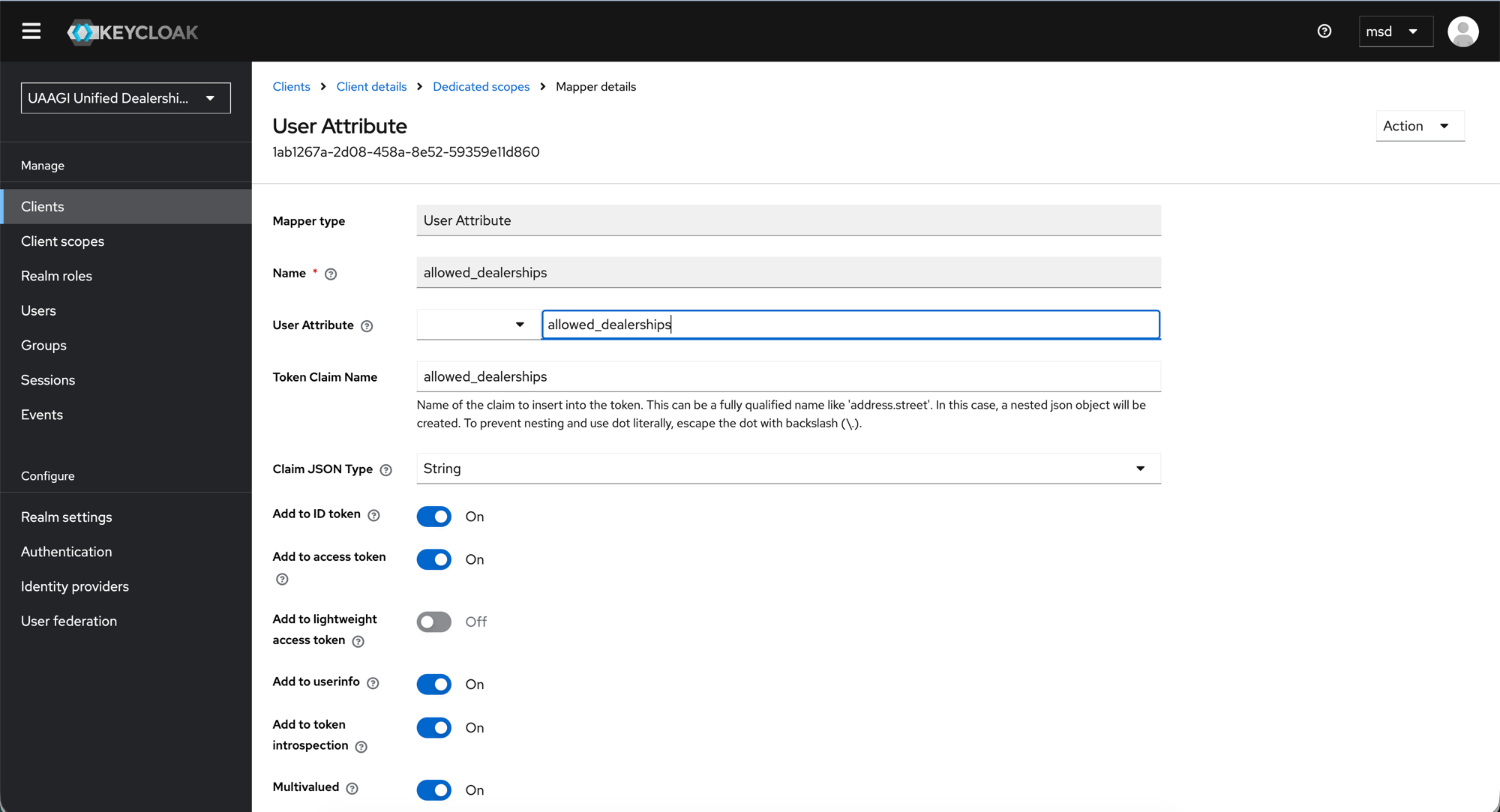
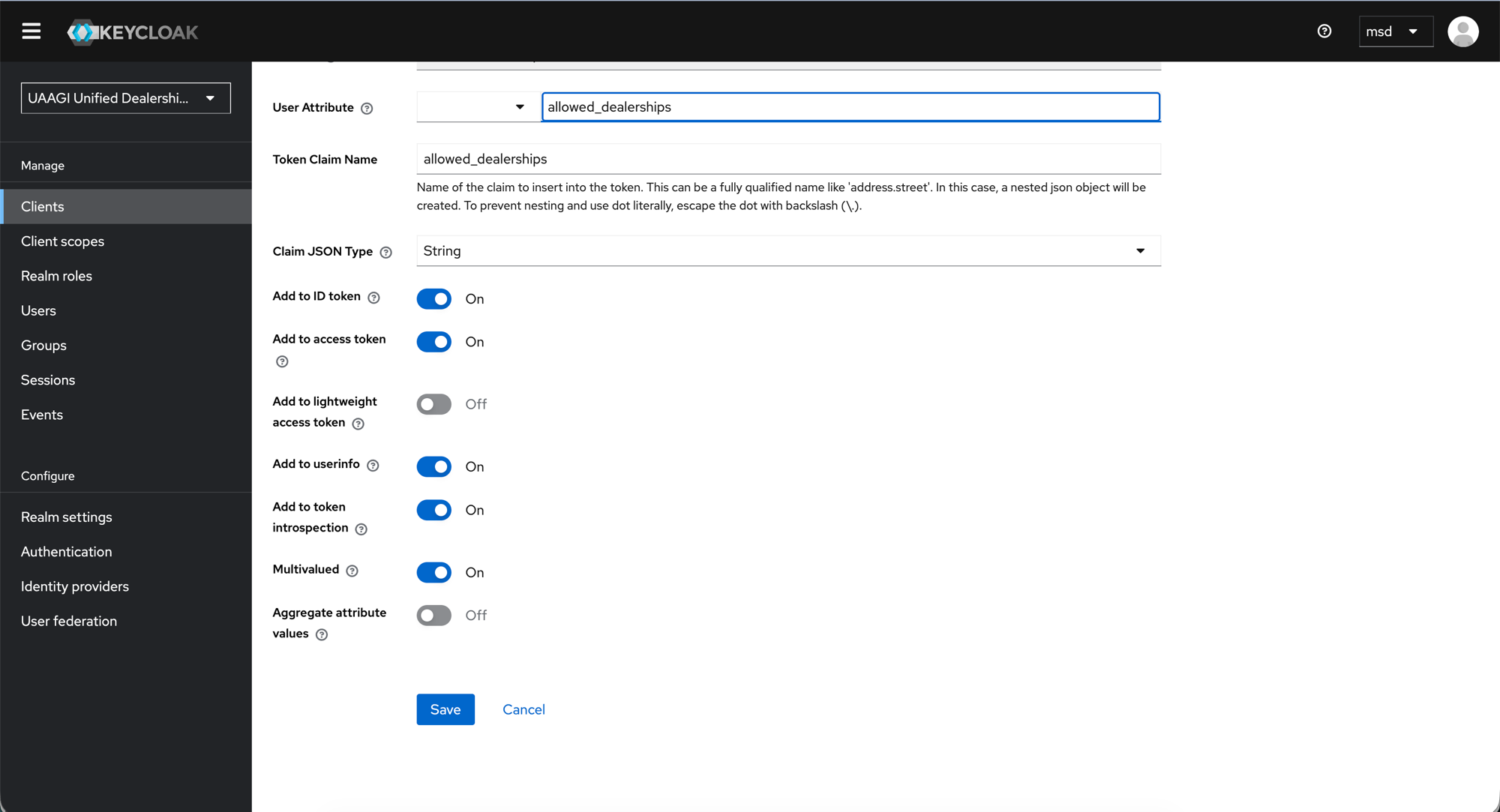
Click any mapper name to see its full configuration. Here is the allowed_dealerships mapper as an example:
Field reference
| Field | Value | Description |
|---|---|---|
| Mapper type | User Attribute | Read-only — set when creating the mapper |
| Name | allowed_dealerships | Display name in the mapper list |
| User Attribute | allowed_dealerships | The key to read from the user's Attributes tab in Keycloak |
| Token Claim Name | allowed_dealerships | The claim name that appears in the JWT token and userinfo response |
| Claim JSON Type | String | Data type of the claim value |
| Add to ID token | On | Include in the ID token (used for logout id_token_hint) |
| Add to access token | On | Include in the access token |
| Add to lightweight access token | Off | Not needed |
| Add to userinfo | On | Include in the /userinfo endpoint response — this is what Odoo reads |
| Add to token introspection | On | Include in introspection responses |
| Multivalued | On | A user can access multiple dealerships — values are returned as a JSON array |
| Aggregate attribute values | Off | Not needed |
:::warning Multivalued is critical for allowed_dealerships
With Multivalued: On, the claim is returned as a JSON array (["makati-dealership", "cebu-dealership"]). If this is Off, only the first value would be returned and the user would see only one dealership.
:::
All 5 mappers — configuration summary
Each mapper follows the same pattern. The only differences are the Name/User Attribute/Token Claim Name (which always match each other) and the Multivalued flag.
| Mapper | User Attribute | Claim Name | Multivalued |
|---|---|---|---|
allowed_dealerships | allowed_dealerships | allowed_dealerships | On |
primary_dealership | primary_dealership | primary_dealership | Off |
employee_id | employee_id | employee_id | Off |
region | region | region | Off |
department | department | department | Off |
All other toggles are the same across all 5 mappers:
| Toggle | Value |
|---|---|
| Add to ID token | On |
| Add to access token | On |
| Add to lightweight access token | Off |
| Add to userinfo | On |
| Add to token introspection | On |
| Claim JSON Type | String |
Dedicated vs. default scopes
These mappers are on the dedicated scope (portal-odoo-dedicated), which means they only apply to tokens issued for the portal-odoo client.
If you want the same claims available on dealership clients too (e.g. bacolod-dealership), you have two options:
- Add the same mappers to each dealership client's dedicated scope — more work, but gives per-client control.
- Create a shared client scope (e.g.
uaagi-dealership-claims) with these mappers and add it as a default scope to all clients — recommended for consistency.
For most setups, dealership clients don't need these custom mappers because the portal handles dealership assignment. The dealership instance only needs standard OIDC claims (email, name, sub) to identify the user.
How it all connects
User Attributes (Keycloak)     Protocol Mappers          Token Claims          Odoo Fields
──────────────────────────     ────────────────          ────────────          ───────────
allowed_dealerships       →    allowed_dealerships   →   allowed_dealerships   →  allowed_dealership_ids
primary_dealership        →    primary_dealership    →   primary_dealership    →  primary_dealership_id
employee_id               →    employee_id           →   employee_id           →  employee_id_uaagi
region                    →    region                →   region                →  region
department                →    department            →   department            →  department
- Sysadmin sets user attributes in Keycloak (see User Management)
- Protocol mappers inject those attributes into the OAuth token on login
- Odoo reads the claims from the userinfo response and updates user fields (see Odoo Configuration)
What's next
- Dealership Clients — create the per-dealership OAuth clients
- User Management — set the user attributes that these mappers read