Managing Dealerships
A dealership is the fundamental record of the Portal — one uaagi.dealership record maps to one Odoo 18 backend on its own subdomain, one Keycloak client, and a set of brands the dealership carries.
Everything the end user sees on the dealership selector is rendered from these records.
System administrators and MSD operations staff provisioning new dealership branches or maintaining existing ones.
Opening the list
From the Odoo backend:
UAAGI Portal ▸ Dealerships
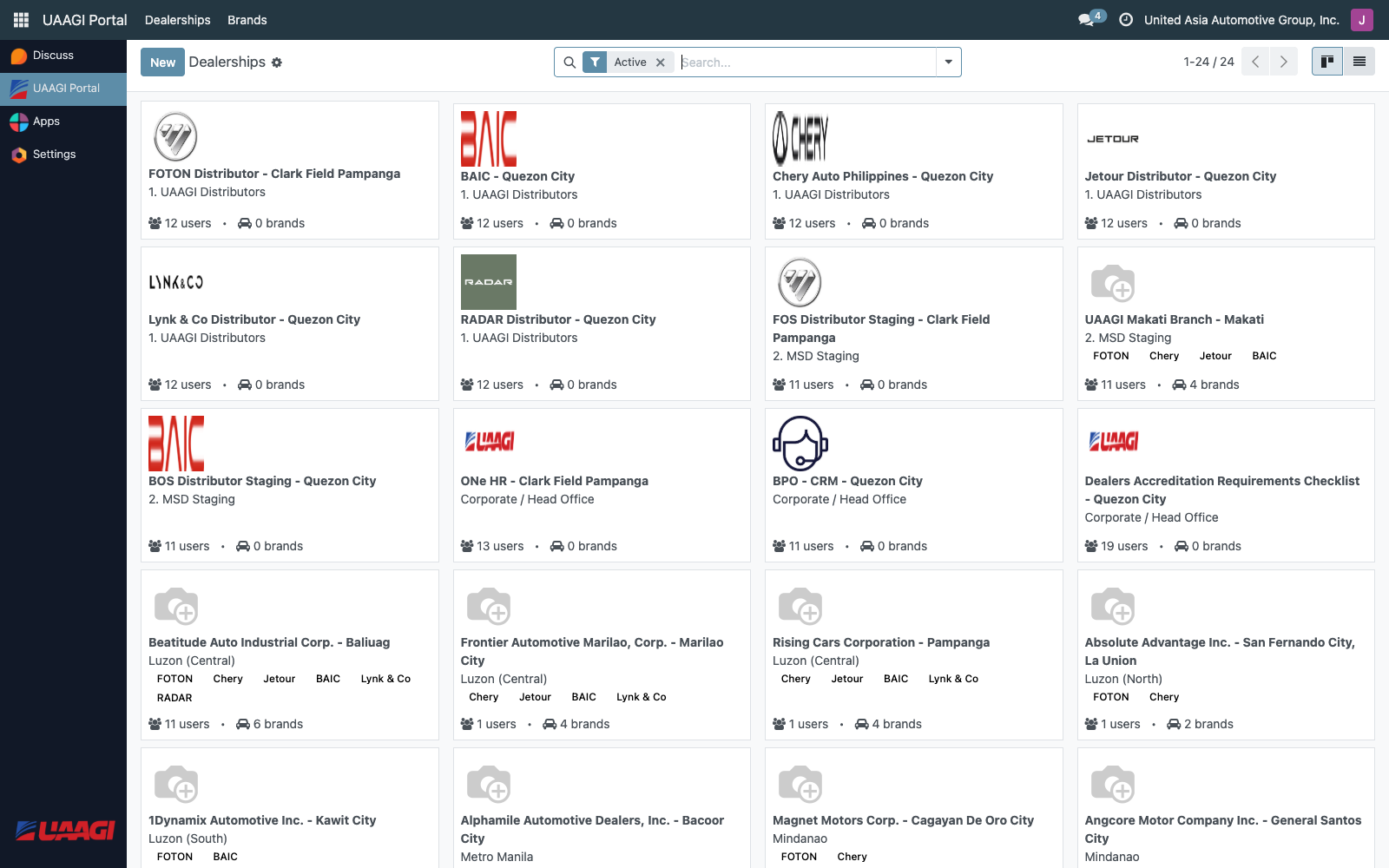
The list opens in kanban view by default — one tile per dealership with logo, region, brand tags, and user/brand counts. Switch to list view for a denser overview with columns for city, region, subdomain, brand count, user count, phone, active, and visible-in-portal flags.
Search and filters
The search bar filters by name, code, city, or subdomain. Pre-defined filters include:
- Active / Archived — toggle archived dealerships
- Visible in Portal / Hidden from Portal — filter by portal visibility
- Region filters — Metro Manila, Luzon (North / Central / South), Visayas, Mindanao
- Group by — Region or City
Creating a dealership
Click New on the dealerships list. The form is split into a header + basic info + a notebook with four tabs: Connection Details, Brands, Contact Information, Operations, and Banner.
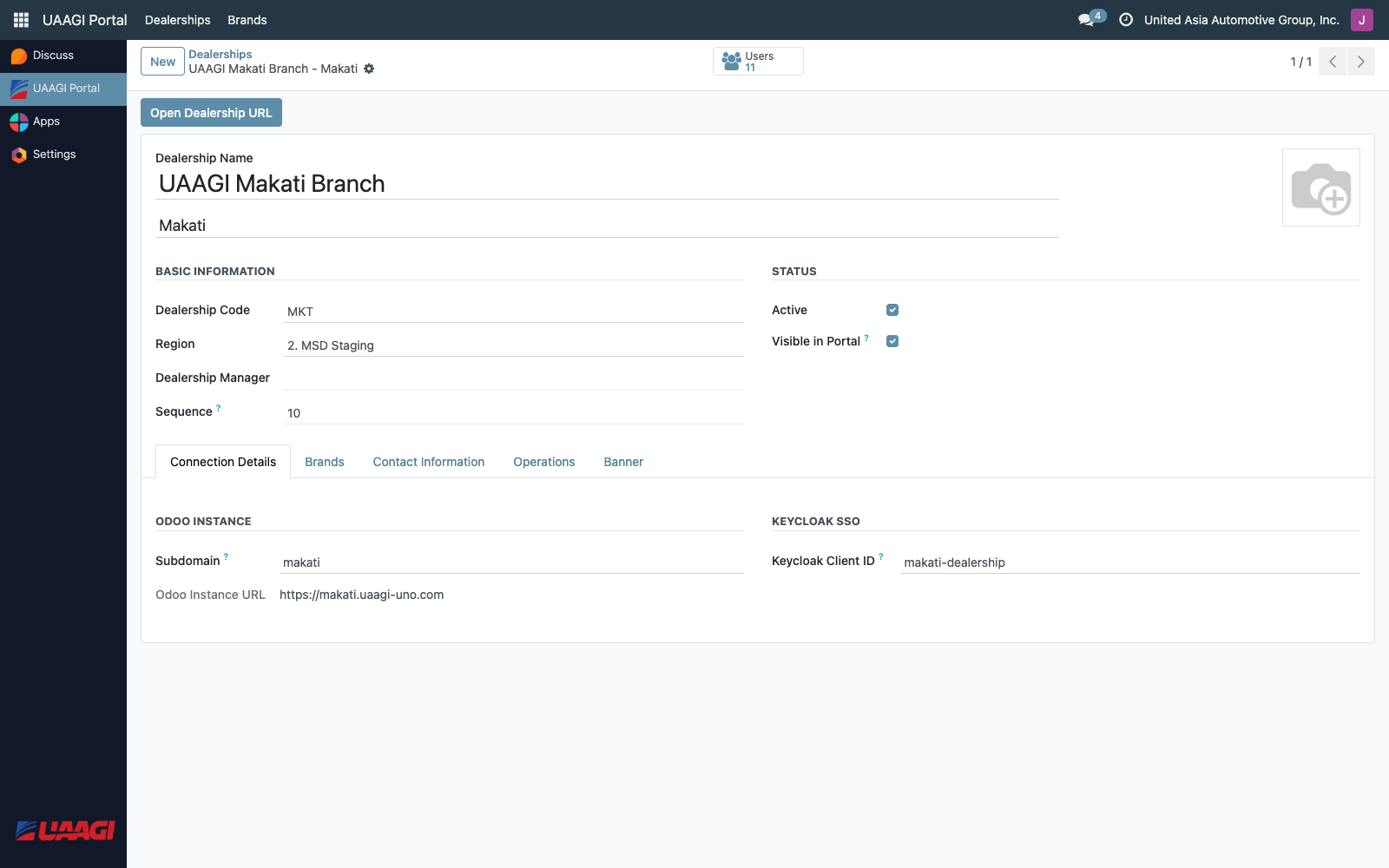
Basic Information
| Field | Required | Notes |
|---|---|---|
| Dealership Name | Yes | Displayed on the card (e.g. UAAGI Manila Central Dealership). Translatable. |
| City | Yes | Appears below the name on the card. |
| Dealership Code | Yes, unique | Short internal code. |
| Region | Yes | Drives the region grouping on the selector. |
| Manager | No | Links to an internal Odoo user. |
| Sequence | No | Controls card order within a region. |
Status
- Active — archive/unarchive the record without deleting it.
- Visible in Portal — hide the card from end users without archiving (useful for pre-provisioning a dealership before go-live).
Connection Details
This tab is where the dealership gets wired to its Odoo instance and its Keycloak client.

| Field | Example | Drives |
|---|---|---|
| Subdomain | manila | The computed Odoo Instance URL becomes https://manila.uaagi-uno.com. Also used to build the SSO redirect when the user clicks a card. |
| Odoo Instance URL | https://manila.uaagi-uno.com | Read-only. Auto-computed from the subdomain. |
| Keycloak Client ID | manila-dealership | Must match the client ID provisioned in Keycloak (see Dealership Clients). This is how the allowed_dealerships Keycloak claim maps onto a dealership record. |
Subdomains must be lowercase, alphanumeric with hyphens, and cannot be one of the reserved names: www, mail, ftp, localhost, admin, api, sso, portal.
Brands
Select every brand the dealership carries. This is a many2many against the brand catalog, and the selected brands are shown as colored tags on the card footer.

The card shows up to six brand tags; any overflow renders as a +N indicator on the end-user portal.
Contact Information
Phone, mobile, email, and address fields. Phone and email appear on the public card; the rest is for internal reference.
Operations
Currently only the Opening Hours free-text field (e.g. Mon–Sat: 8:00 AM – 6:00 PM).
Logo and Banner
- Logo (top of the form, as avatar) — appears on the dealership card in the selector. Upload a square PNG/JPG, ideally ≥ 200 × 200 px.
- Banner (Banner tab) — reserved for future use; not currently rendered on the end-user page.
Form header actions
- Open Dealership URL — opens the computed
odoo_urlin a new browser tab. Useful for a quick smoke test after wiring up the subdomain.
Statistics button
On the form, the Users stat button at the top right opens the list of Odoo users whose allowed_dealership_ids includes this dealership. This is the fastest way to answer "who currently has access to this branch?"
Constraints to be aware of
| Constraint | Behavior |
|---|---|
code unique | Two dealerships cannot share the same code. |
subdomain unique | Two dealerships cannot share a subdomain. |
keycloak_client_id unique | Two dealerships cannot point to the same Keycloak client. |
| Email format | Validated against a standard regex if provided. |
After saving
Creating the record in Odoo is only one side of provisioning a dealership. To fully bring a dealership online you also need to:
- Create the matching Keycloak client — see Dealership Clients.
- Stand up (or repoint DNS to) the Odoo 18 instance at
<subdomain>.uaagi-uno.com. - Assign the dealership's
keycloak_client_idto the relevant users in Keycloak via theallowed_dealershipsattribute — see User Management.