User Dealership Access
On the Portal instance, every Odoo user carries a small set of UAAGI-specific fields that determine which dealerships they can see on the selector and which additional information appears on their portal header.
These fields are almost always populated automatically from Keycloak — they rarely need manual editing. This page documents the form so administrators know what they're looking at when they do.
Keycloak is the source of truth. The allowed_dealerships, primary_dealership, employee_id, region, and department claims on the OAuth token overwrite the Odoo fields on every sign-in. Editing them manually in Odoo works, but the change is lost the next time the user signs in. Always make the change in Keycloak (see User Management).
Opening the users list
Settings ▸ Users & Companies ▸ Users
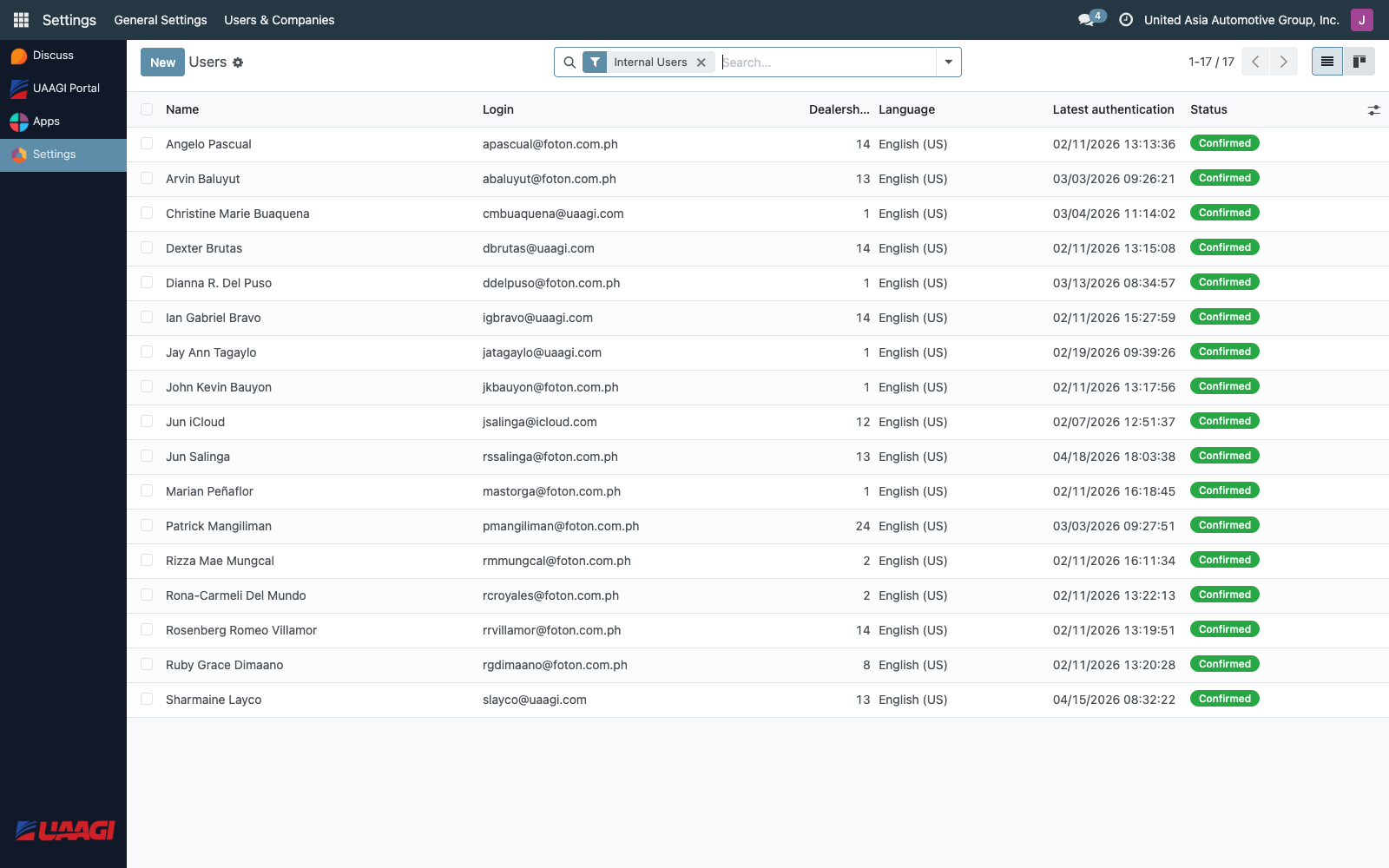
The list view is extended with a Dealerships column showing the count of allowed dealerships per user. The Primary Dealership column is available as an optional field.
The UAAGI Dealership Access tab
Open any user and navigate to the UAAGI Dealership Access tab — added immediately after the standard Access Rights tab.
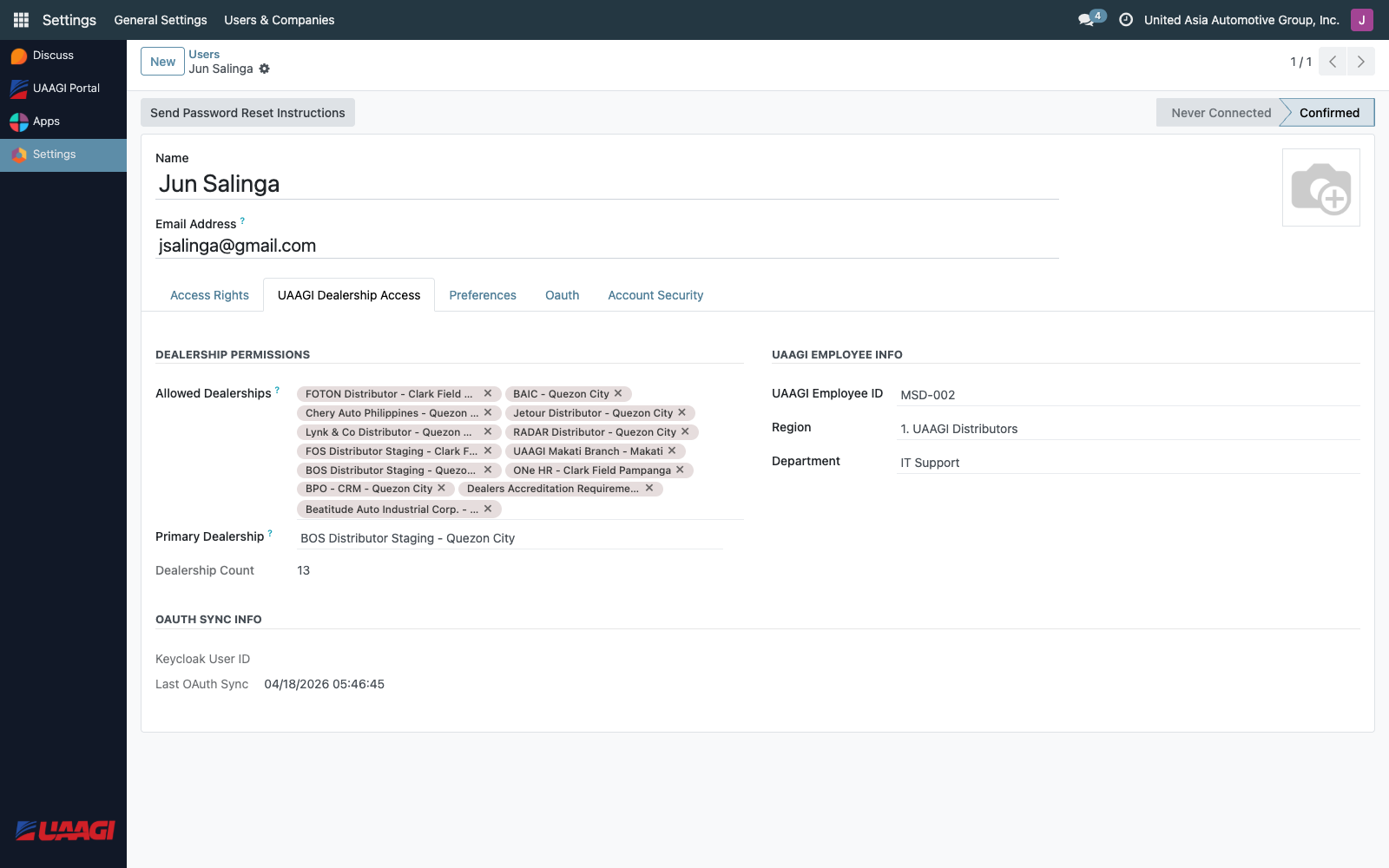
Dealership Permissions
| Field | Purpose |
|---|---|
| Allowed Dealerships | The many2many list of dealerships this user can access. Populated on sign-in from the Keycloak allowed_dealerships token claim. |
| Primary Dealership | Optional default — not currently used to auto-redirect, but available for reporting and future defaulting logic. Must be one of the Allowed Dealerships (enforced as a constraint). |
| Dealership Count | Read-only computed field matching the list column. |
UAAGI Employee Info
| Field | Purpose |
|---|---|
| UAAGI Employee ID | Displayed as a badge in the portal header. From the employee_id token claim. |
| Region | Selection field. Rendered as a location badge in the portal header. From the region token claim. |
| Department | Selection field: Sales, Service, Parts, Finance, Management, IT Support, HR, Corporate. Informational. |
OAuth Sync Info
Read-only fields for auditing the last OAuth round-trip:
| Field | Purpose |
|---|---|
| Keycloak User ID | The sub claim — Keycloak's stable user UUID. Handy when tracing issues across systems. |
| Last OAuth Sync | Timestamp of the most recent OAuth sign-in that refreshed this user's UAAGI attributes. |
What happens on sign-in
Every successful Keycloak sign-in through the Portal triggers _process_uaagi_oauth_attributes:
- Read
allowed_dealershipsfrom the validated token (single string or list). searchuaagi.dealershipfor records wherekeycloak_client_idis in that list.- Replace the user's
allowed_dealership_idswith the matched records — this is the authoritative overwrite. - Read
primary_dealership, find the matching dealership, write it toprimary_dealership_id. - Copy
employee_id,region,department, andsubinto their respective Odoo fields. - Stamp
last_oauth_syncwithnow().
If the Keycloak allowed_dealerships claim contains a client ID that has no matching uaagi.dealership record (by keycloak_client_id), the attribute is silently ignored and the user's access shrinks to only the dealerships that did match. Check the Odoo logs for OAuth: No dealership records found for codes: when a user reports missing access.
Internal vs portal users
The Portal's _generate_signup_values override ensures that every OAuth-signed-up user becomes an internal user, not a portal user. This is intentional — the auto-provisioning removes the base.group_portal group and adds base.group_user instead.
The reasoning: a UAAGI employee who signs in via Keycloak is going to land in an Odoo backend on a dealership instance. Backend access requires the internal user group, not portal user. The Portal itself doesn't care what group the user has (the dealership picker works for both), but the downstream instances do.
Granting administrative access
To let a user manage dealerships or brands, assign them one of the security groups:
- UAAGI Portal User — read-only access to their own dealerships. Every OAuth-provisioned user should have this.
- UAAGI Portal Manager — can CRUD dealerships and brands.
- UAAGI System Administrator — full admin rights including OAuth provider configuration.
These groups are assigned on the standard Access Rights tab, not the UAAGI tab.