Banks
A Bank (crm.bank) is a financing partner whose loan rates the BPO Quotation Calculator can offer to customers. Banks are synced from each brand's distributor — they're not manually maintained on the BPO side.
:::info Brand-scoped
Every bank is tied to exactly one brand because each brand has its own distributor instance with its own bank list. The same bank name might appear under FOTON and Chery as two separate crm.bank rows. The (brand_id, code) pair is unique.
:::
Where banks come from
Banks live on the distributor's Odoo 12 instance as cheryapp.banks records, each with a list of loan rate rows (cheryapp.bank.rate). The BPO CRM mirrors them locally so:
- The Quotation Calculator's Financing Bank dropdown is responsive (no JSON-RPC round-trip per keystroke)
- Bank lists work even when the distributor is briefly unreachable
- Audit pulls can run against local data with full Odoo search/filter
Sync paths
There are three ways the local crm.bank mirror gets refreshed:
1. Scheduled cron (every 6 hours)
The cron CRM: Sync Distributor Banks and Rates runs every 6 hours, looping over every active distributor-connected brand and pulling the latest banks + rates. This is the normal happy path — for most operations, banks just stay in sync without anyone touching anything.
The cron lives at Settings → Technical → Scheduled Actions and can be paused or rescheduled by an admin. Each brand syncs in its own savepoint, so a single brand failing doesn't taint the others.
2. Manual brand sync (Sync Banks button)
Open BPO CRM → Data → Brands, open a brand, and click Sync Banks in the form header.
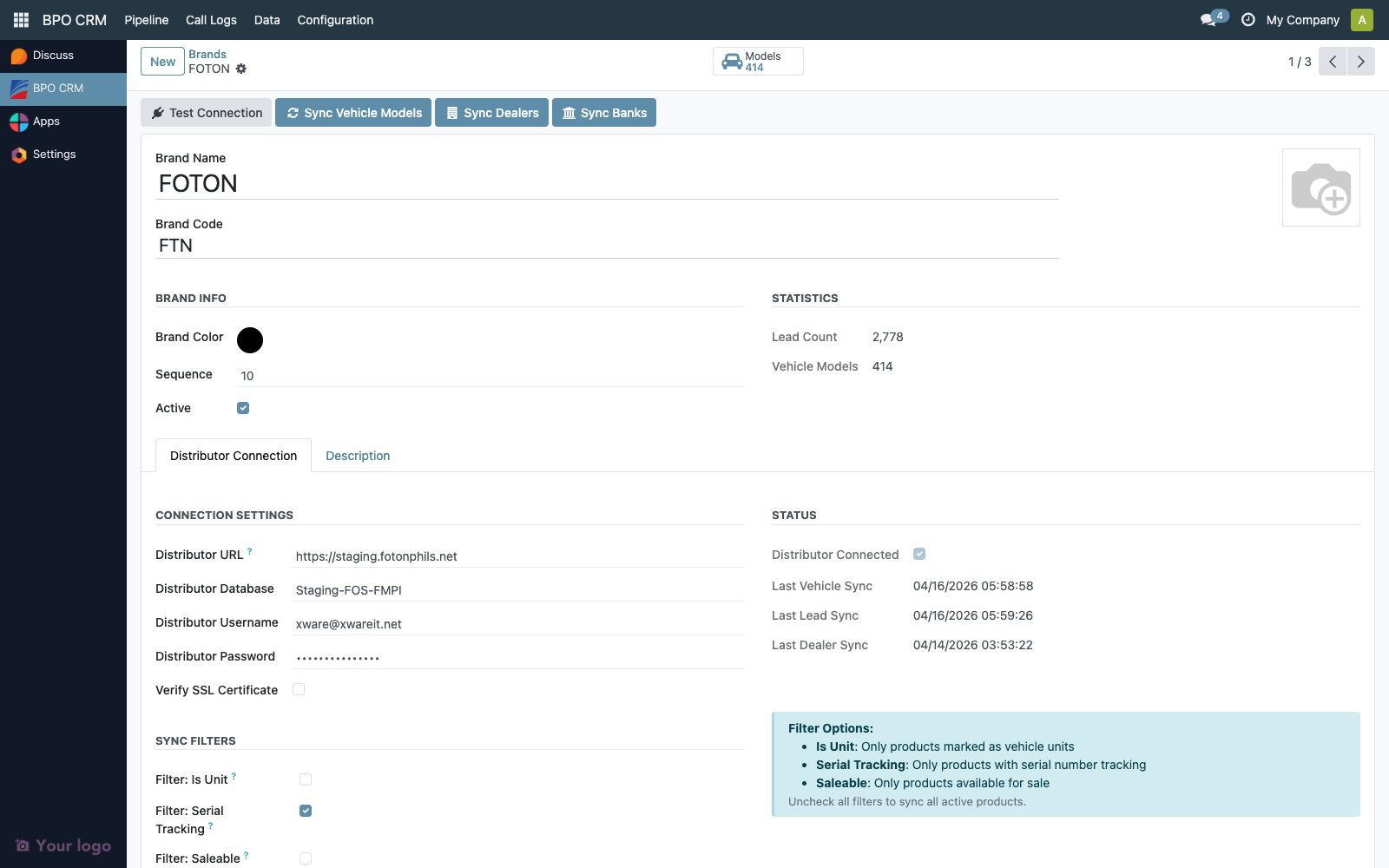
This pulls banks and rates for that brand only. Use it when you've just added a new brand, or when you want to verify the connection without waiting six hours for the cron.
The brand's distributor_last_bank_sync timestamp updates on every successful run. You can see it on the Brand form's Distributor Connection tab.
3. From the lead form (Update Bank Rates button)
When an agent is mid-quotation and the customer mentions a bank promo that just started, they can click Update Bank Rates on the Quotation tab. This calls the same classmethod the cron uses (across all active brands, via sudo()) and re-opens the lead form so the dropdowns refresh immediately.
See Quotation Calculator → Update Bank Rates button for the user-side behaviour.
Open the Banks list
Navigate to BPO CRM → Data → Banks.
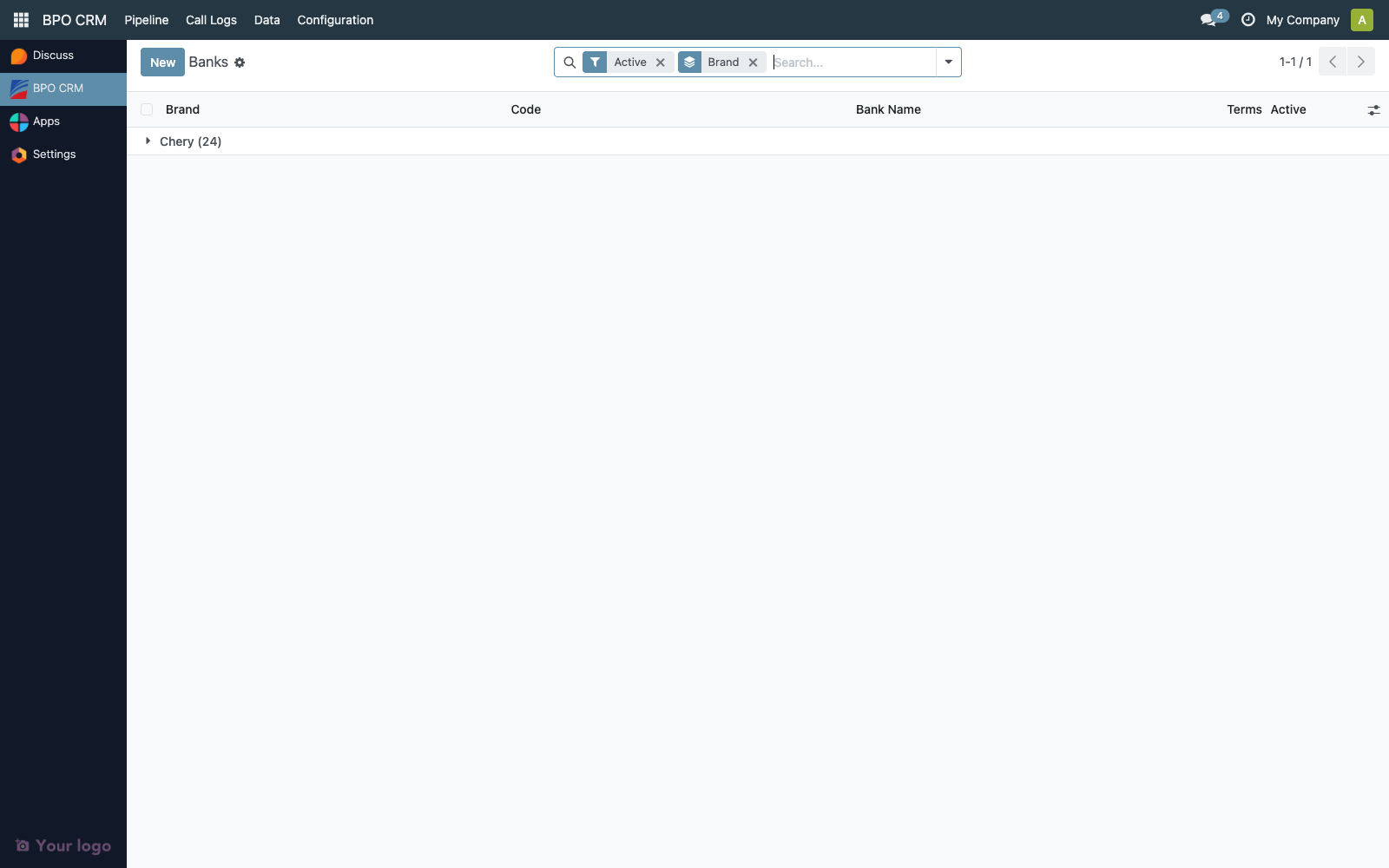
The default view groups by brand. Each row shows code, name, term count, and the active flag.
| Column | Description |
|---|---|
| Sequence | Drag-handle. Order in dropdowns. |
| Brand | Many-to-one back to crm.brand. |
| Code | Stable code from the distributor. Used as the sync upsert key. |
| Name | Display name. |
| Terms | Computed count of crm.bank.rate rows (the loan term tuples) attached to this bank. |
| Distributor Bank ID | Optional. Remote id on the distributor side, populated by the sync. Hidden by default. |
| Active | Mirrors the distributor's active flag. |
The bank form
Click any row to open the form.
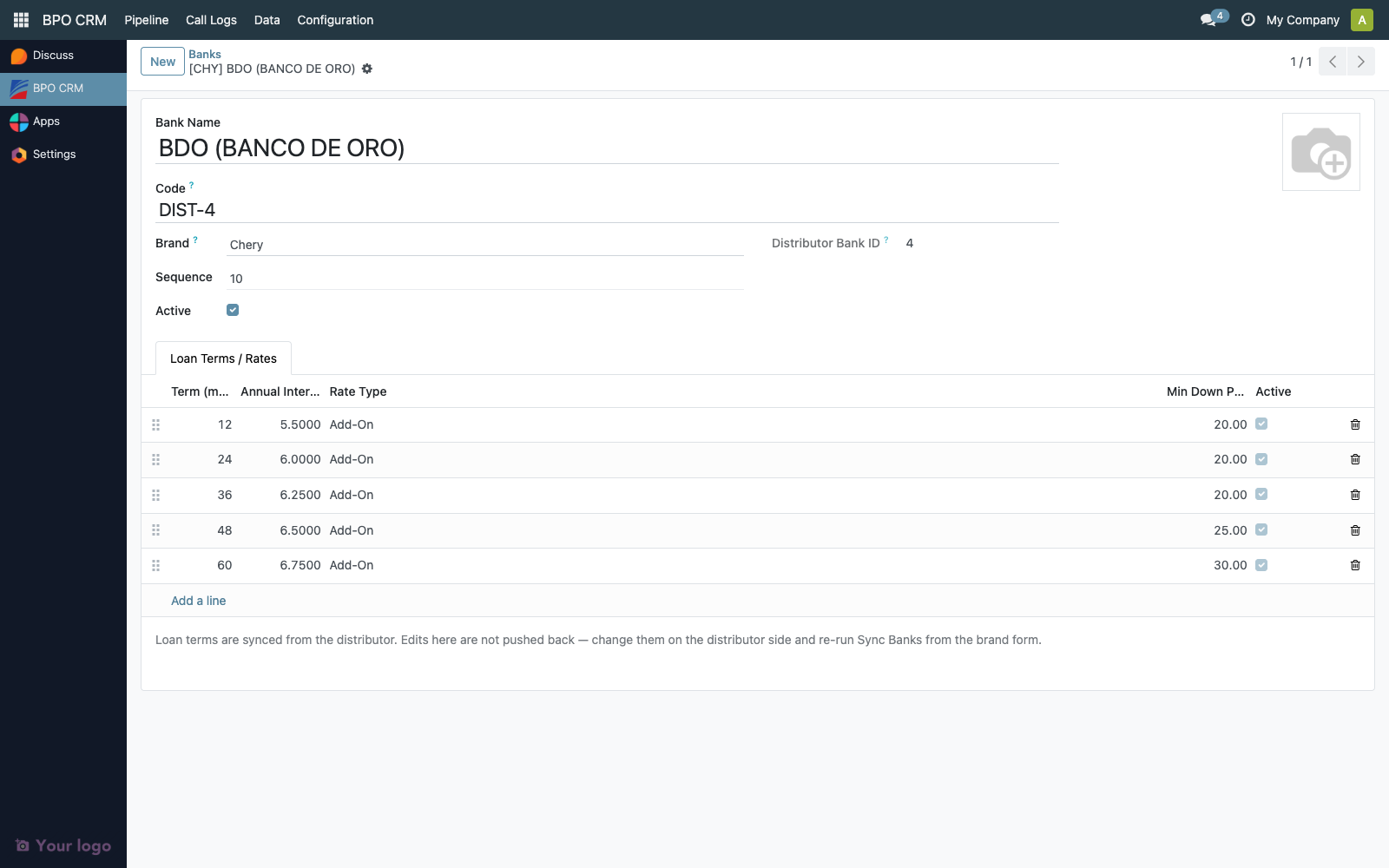
The form has:
- Logo, Name, Code in the title block — Logo is synced from the distributor when present
- Brand picker (locked to its current brand once created — banks belong to exactly one brand)
- Sequence, Active, Distributor Bank ID (read-only)
- Loan Terms / Rates notebook tab with an embedded editable list of every
crm.bank.raterow this bank offers
The rates list is technically editable but changes do not push back to the distributor — edit them on the distributor side, then click Sync Banks to pull the new values down. Any local edit will be overwritten on the next sync, so the embedded editor is best treated as a quick correction tool for incident response, not for routine maintenance.
See Loan Rates for the rate row details.
Field reference
| Field | Type | Source | Notes |
|---|---|---|---|
name | Char | Distributor | Required |
code | Char | Distributor | Required, unique per brand. Sync key. |
logo | Binary | Distributor | Optional |
sequence | Integer | Distributor | Default 10 |
active | Boolean | Distributor | Default True |
brand_id | Many2one → crm.brand | Sync caller | Required, ondelete=cascade |
rate_ids | One2many → crm.bank.rate | Sync | Refreshed on each Sync Banks call |
rate_count | Integer | Computed | |
distributor_bank_id | Integer | Distributor | Remote id, used for upsert |
display_name | Char | Computed | Format: [BRAND] Bank Name |
Required for a valid record: name, code, brand_id.
Access matrix
| Group | Read | Sync (button + cron) | Edit Locally | Delete |
|---|---|---|---|---|
| BPO Agent | ✅ | ✅ (Update Bank Rates button) | ❌ | ❌ |
| BPO Supervisor | ✅ | ✅ | ❌ | ❌ |
| BPO Manager | ✅ | ✅ + Brand-level Sync Banks | ✅ | ✅ |
Local writes are intentionally restricted to managers because the sync overwrites them on the next pass. The Sync Banks button on the brand form is gated on the manager group via the brand form's existing access; the lead-form Update Bank Rates button uses sudo() so any agent can trigger the cron classmethod even without distributor credentials.
Audit trail
crm.bank is configuration data with a sync source, so the audit story has two layers:
On the BPO side:
create_uid,create_date,write_uid,write_date— standard bookkeeping. After the first sync, these are usuallyOdooBotsince the cron runs as superuser.distributor_bank_idproves the row came from the sync, not a manual paste
On the distributor side:
- The original
cheryapp.banksrow is the source of truth forname,code,logo,active, and the rate rows - Distributor admins handle their own audit log there
Typical audit questions
"When was the BNK partner last synced?"
- Open BPO CRM → Data → Brands → open the brand → Distributor Connection tab → Last Bank Sync field
"Has bank X disappeared from the dropdown? When did it happen?"
- Two possibilities: the distributor archived it (
active=False), or it was deleted on the distributor side. The local row will be archived (active=False) on the next sync. Checkwrite_dateon the localcrm.bankrow to see when.
Retention
Banks are never auto-deleted by the sync — if the distributor archives a bank (active=False), the local row is also archived but kept. Hard-delete is blocked if any crm.lead references the bank via quotation_bank_id. Even a manager deleting a row from the list view will get blocked unless every lead that ever quoted that bank has been archived.
Troubleshooting
| Symptom | Likely cause |
|---|---|
Sync Banks fails with cheryapp.banks not accessible | The distributor is on an older branch that doesn't have cheryapp.banks yet, or the service account lacks read on the model. Coordinate with the distributor admin. |
| Sync Banks reports 0 banks but the distributor has them | The distributor has them archived (active=False). The sync only pulls active rows. |
Bank appears with code DIST-42 instead of a real code | The distributor row had no code field set. The sync synthesises DIST-<remote_id> to keep the local unique constraint happy. Ask the distributor admin to populate the code field. |
| Two banks with the same name appear under different brands | Correct behavior. Each brand has its own bank list — same bank, two crm.bank rows. |
Manual edit to name got overwritten | Expected. The sync overwrites on every run. Edit on the distributor instead. |