Dealerships
A Dealership represents a physical dealer branch (e.g. Manila — FOTON). Each dealership:
- Is linked to one or more Brands.
- Has its own Odoo 18 instance where Sales Orders will be created when a BPO lead is marked Won.
- Has a manager contact for won-lead notifications.
:::info Who can edit this? BPO Managers can edit everything including the Odoo Connection credentials. BPO Supervisors can view and edit basic fields. Agents are read-only. :::
Open the Dealerships list
Navigate to BPO CRM → Data → Dealerships.
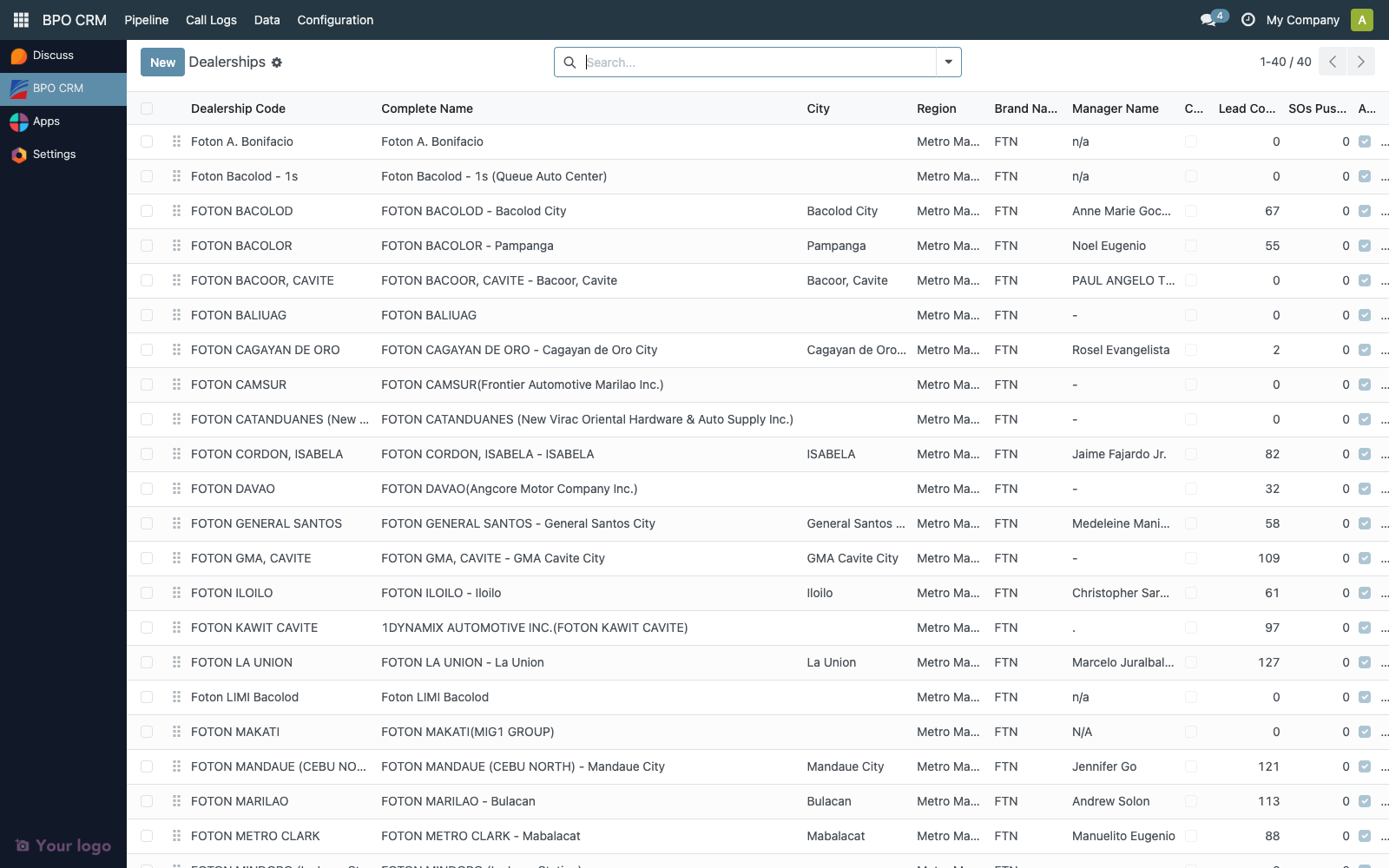
Key columns:
| Column | Description |
|---|---|
| Code | Unique short code. Auto-generated as DIST-<id> when synced from distributor if no dealer_name is present. |
| Complete Name | Display name combining name, city and brand. |
| City / Region | Location. |
| Brands | Linked brands (many-to-many tags). |
| Manager | Manager name used for notifications. |
| Odoo Connected | Last Test Connection result for the remote Odoo 18 instance. |
| Leads / SOs Pushed | Running counters. |
Use the search bar filters Connected / Not Connected to triage dealerships that still need setup.
Create a dealership — two paths
Path A: Auto-sync from a distributor (recommended)
If the distributor maintains a list of dealers, you can pull them in one click.
- Go to BPO CRM → Data → Brands, open the brand.
- Click Sync Dealers in the header.
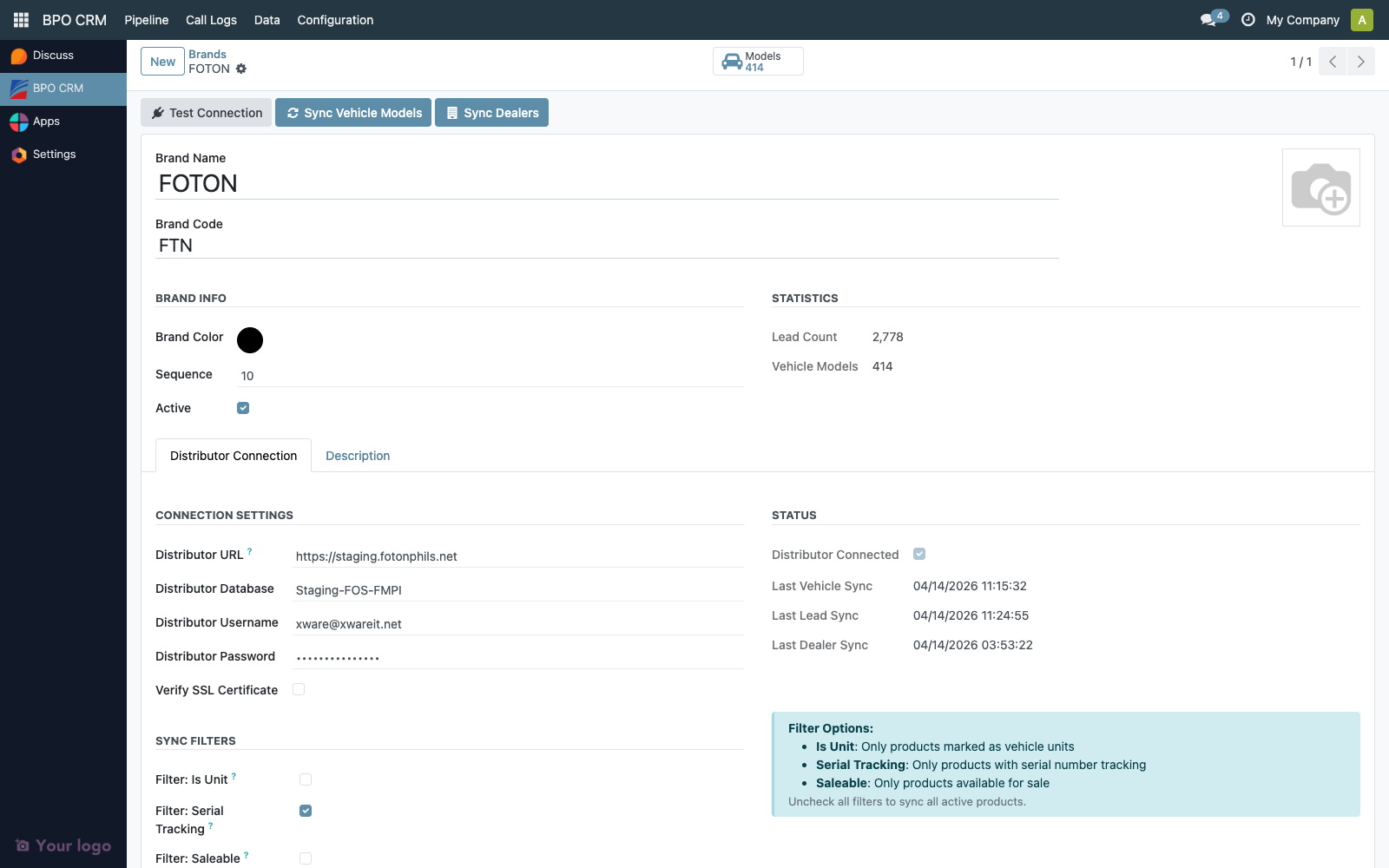
The CRM reads res.partner records where chery_dealer = True on the distributor and creates or updates matching crm.dealership records using:
namefromres.partner.namecodefromres.partner.dealer_name, orDIST-<remote_id>if missing, with automatic suffixing if a collision occurs- contact fields:
phone,mobile,email,street,city - manager fields:
dealer_gm→manager_name,dealer_gm_email→manager_email
The brand is automatically linked to each synced dealership.
:::note Error isolation
If one dealer record fails to sync (bad data, collision, etc.), the rest continue. Check the server log for Failed to sync dealer '…' entries.
:::
After sync, the toast reports how many dealers were created or updated. The brand's Last Dealer Sync timestamp updates.
Path B: Manual create
Click New on the Dealerships list.
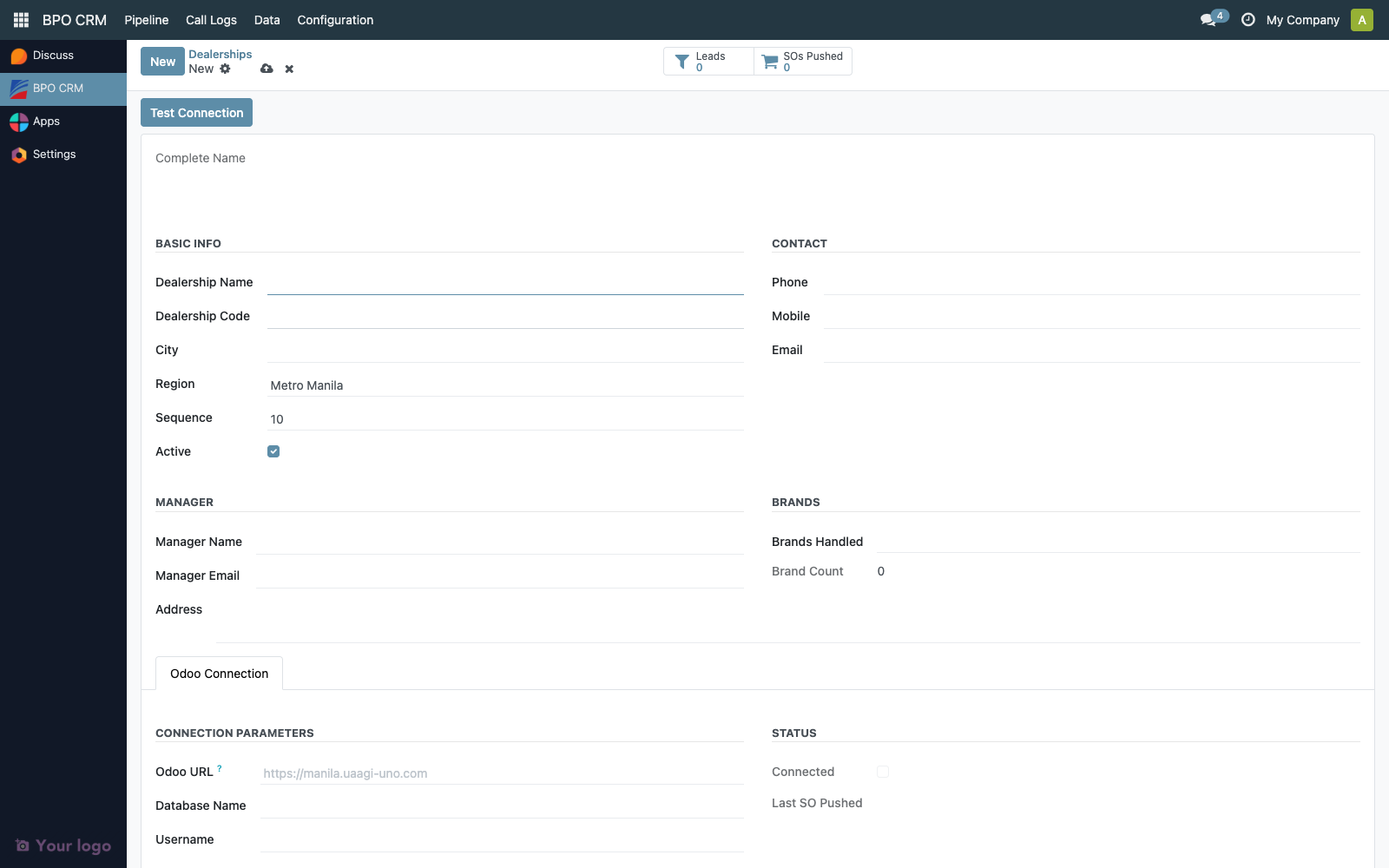
Fill in:
| Group | Fields |
|---|---|
| Basic Info | Name, Code (unique), City, Region, Sequence, Active |
| Contact | Phone, Mobile, Email |
| Manager | Manager Name, Manager Email (used for won-lead notifications) |
| Brands | Many-to-many — select every brand this dealership sells |
| Address | Free-text street address |
Save.
Configure the Odoo Connection
Open the Odoo Connection tab. (This tab is visible only to BPO Managers.)
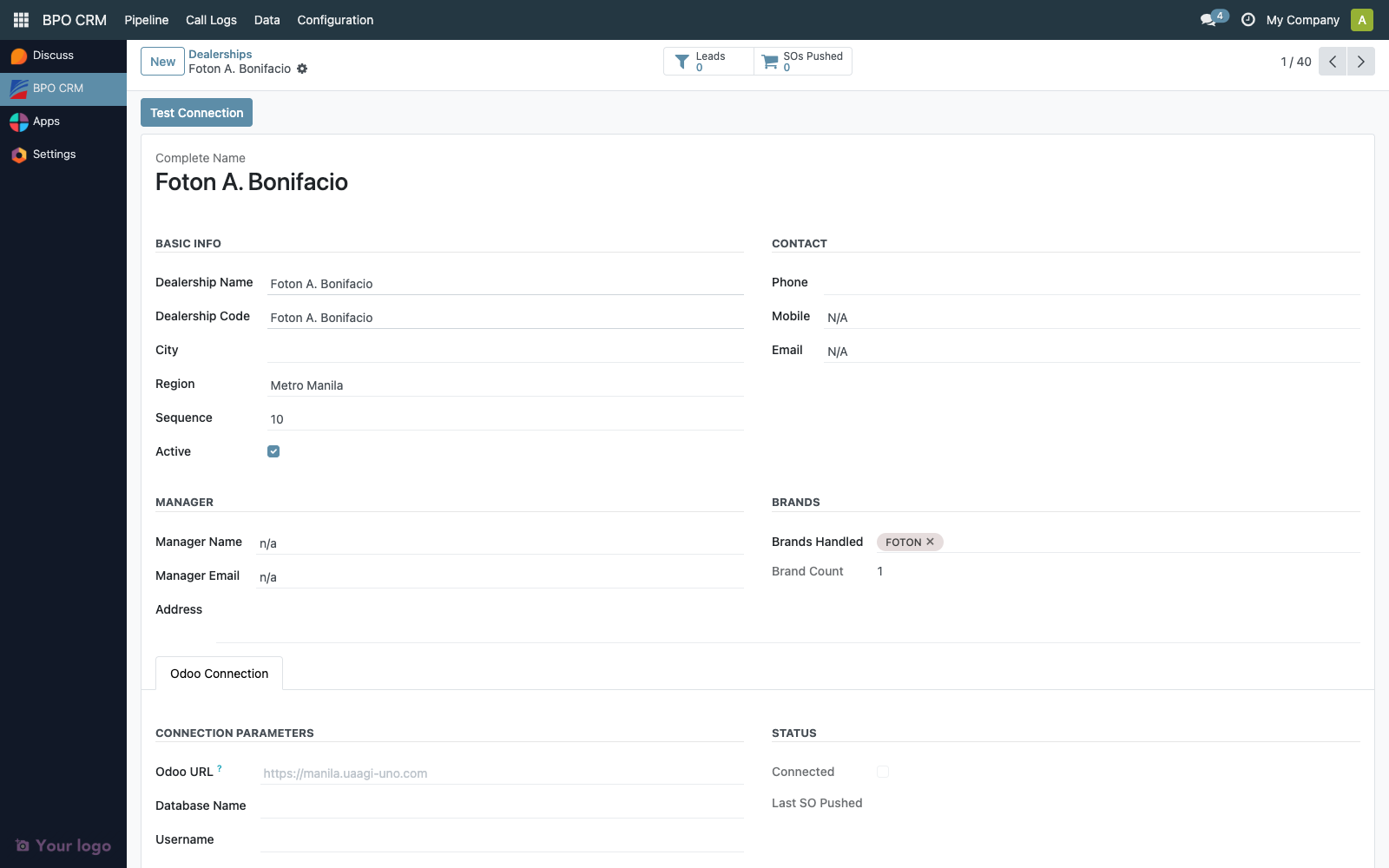
| Field | Example | Notes |
|---|---|---|
| Odoo URL | https://manila.uaagi-uno.com | The dealership's own Odoo 18 instance. No trailing slash. |
| Database | manila_prod | Odoo DB name on that instance. |
| Username | bpo_push@manila.uaagi-uno.com | Service account on the dealer instance. |
| Password | (masked) |
Required permissions on the dealer side
The service account must be able to:
- Create
res.partner(to create the customer if they don't already exist). - Create / Read
sale.order,sale.order.line,product.product.
Test the connection
Click Test Connection.
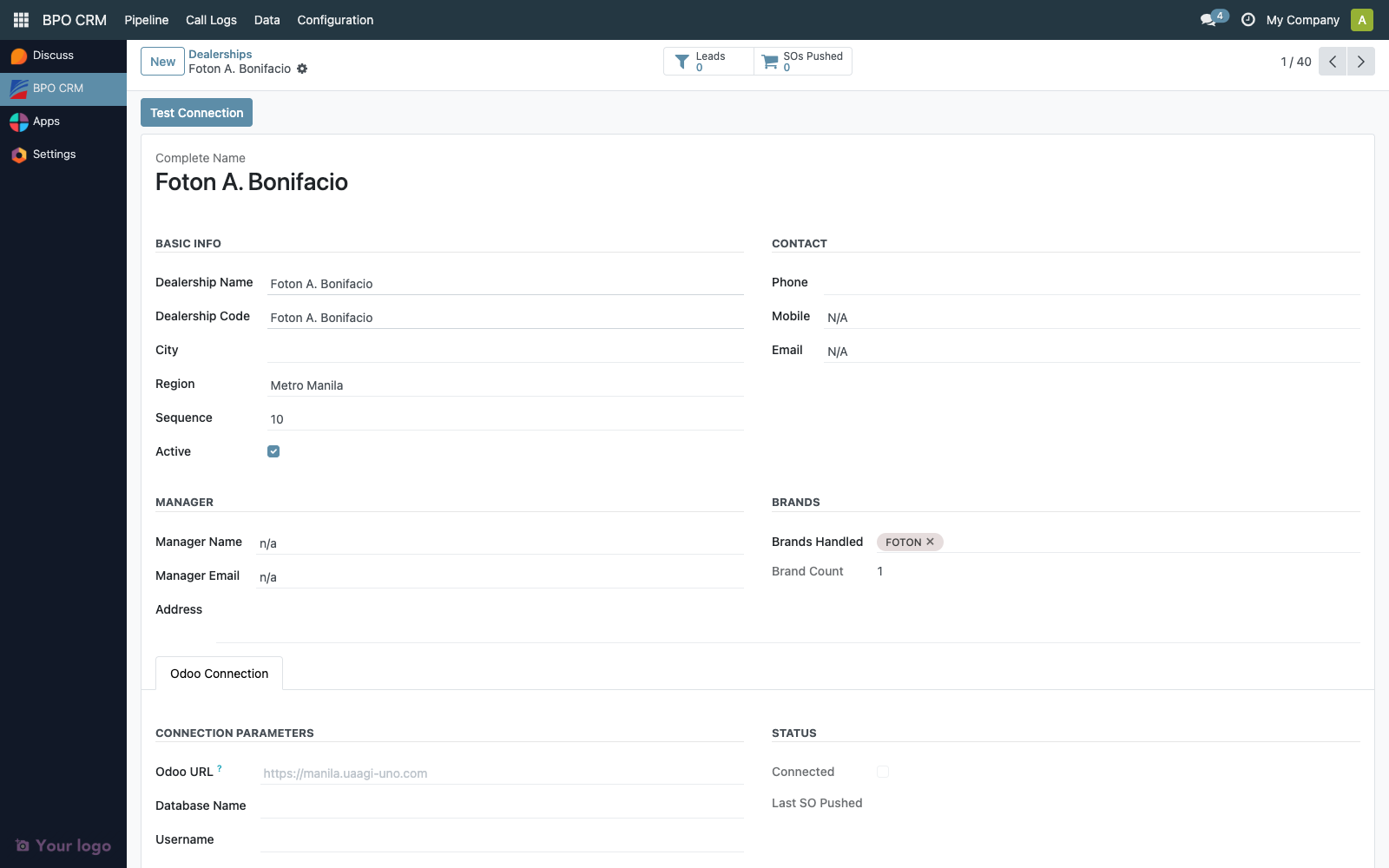
A green Connected ribbon appears on the form when successful. A yellow Not Connected ribbon shows when a URL is set but the last test failed.
What happens when a lead is Won
When an agent marks a lead as Won:
- The CRM validates that the lead's
dealership_idhas an Odoo connection configured. - Via JSON-RPC, it looks up (or creates) a
res.partnerin the dealer's Odoo for the lead's customer. - It creates a
sale.orderin the dealer's Odoo with the lead's vehicle model. - The remote SO reference is stored back on the lead (
dealer_so_id,dealer_so_name). - A notification email is sent to the dealership manager_email.
If any step fails the lead stays in Negotiation, and the error is surfaced in the chatter.

Troubleshooting
| Symptom | Likely cause |
|---|---|
| Won lead fails with "Dealership not configured" | Dealership has no odoo_url. Open the dealership and fill the Odoo Connection tab. |
Won lead fails with AccessError creating sale.order | Service account on the dealer instance lacks SO create rights. |
Dealer sync collided codes into NAME-<id> suffixes | Multiple distributor partners share the same dealer_name. Clean up on the distributor or rename the local codes. |
| Manager email not received on won lead | manager_email is empty, or dealership's outbound mailer isn't configured. |