Loan Rates
A Loan Rate (crm.bank.rate) represents one specific financing offer a bank makes — a tuple of (term, interest, rate type, minimum down payment). Each row drives one entry in the BPO Quotation Calculator's Loan Term dropdown. Like banks, loan rates are synced from the distributor and not manually maintained on the BPO side.
:::tip One bank, many rate rows
A bank typically offers multiple loan options — e.g. 12, 24, 36, 48, and 60-month terms, each with their own interest rate and minimum down payment. Each option is its own crm.bank.rate row. Agents pick a row in the calculator; the row's rate type drives whether the math is add-on or amortizing.
:::
What's in a rate row
| Field | Type | Notes |
|---|---|---|
| Bank | Many2one → crm.bank | The parent bank. Required, ondelete=cascade. |
| Brand | Many2one → crm.brand | Related stored from bank_id.brand_id. Cheap filter for grouping. |
| Display Name | Char | Computed: `Bank — N mo @ X.XX% (Add-On |
| Term (months) | Integer | Required, > 0 |
| Annual Interest % | Float | Required, ≥ 0. The headline rate the bank advertises (e.g. 6.5 for 6.5%). |
| Rate Type | Selection | add_on or effective. Defines the monthly amortization formula. |
| Min Down Payment % | Float | The bank's minimum down payment as a percentage of the vehicle SRP. Drives the soft DP warning on the quotation calculator. |
| Sequence | Integer | Order in the calculator's Loan Term dropdown |
| Active | Boolean | Mirrors the distributor's active flag |
| Notes | Text | Free text from the distributor |
| Distributor Rate ID | Integer | Remote id, used as the sync upsert key |
Constraints:
term_months > 0interest_rate ≥ 00 ≤ min_dp_pct ≤ 100- Unique on
(bank_id, term_months, rate_type)— a bank cannot have two rows with the same term and rate type
Add-on vs effective rate type
This is the most important field on a rate row because it determines how the calculator computes the monthly amortization. Different banks quote differently and the dealer financing market in the Philippines uses both.
Add-on rate
total_interest = principal × (annual% / 100) × years
monthly        = (principal + total_interest) / months
The bank computes the total interest once at the start as a flat percentage of the principal multiplied by the loan term in years, then divides the principal + interest evenly across the months. This is the conventional "add-on" or "flat" rate quoted by most Philippine dealer financing programs.
Example: ₱960,000 principal, 6.5% annual, 4 years (48 months)
- Total interest =
960,000 × 0.065 × 4= ₱249,600 - Monthly =
(960,000 + 249,600) / 48= ₱25,200
Effective rate
r       = (annual% / 100) / 12
factor  = (1 + r) ^ months
monthly = principal × (r × factor) / (factor − 1)
Standard amortizing PMT formula. The customer pays back interest on the declining balance, not on the full principal for the full term. Same advertised rate yields a lower monthly amortization than add-on.
Example: Same numbers
r=0.065 / 12≈ 0.005417factor=(1.005417)^48≈ 1.2961- Monthly ≈ ₱22,729
- Total interest =
monthly × 48 − 960,000≈ ₱131,000
The same vehicle, same down payment, same advertised "6.5%" — but the customer pays roughly ₱118,000 more under the add-on convention. This is why agents need to pick the right rate_type per bank, and why the rate sheet on the distributor side stores the convention explicitly.
If the annual rate is zero, the effective formula falls back to monthly = principal / months (interest-free instalment plan).
Where rate rows are used
Rate rows are pulled into a single dropdown on the lead Quotation tab when the agent picks a bank:
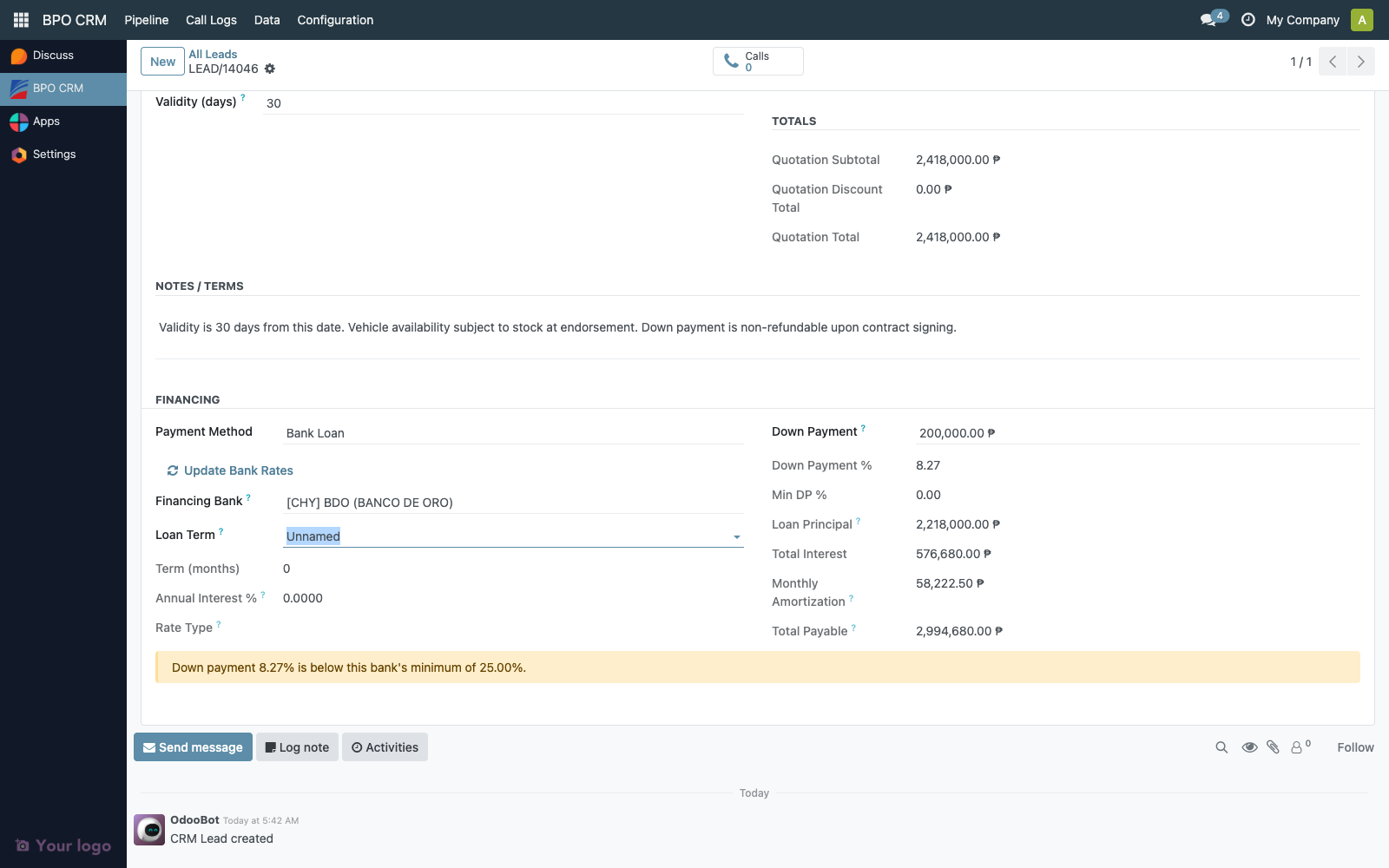
The dropdown is filtered to active rows of the chosen bank only. The display name format [BANK] — 48 mo @ 6.50% (Add-On) makes the term + rate type immediately readable.
When a row is picked:
crm.lead.quotation_term_months,quotation_interest_rate,quotation_rate_type,quotation_min_dp_pctare populated as related stored fields- The financing computation triggers — see Quotation Calculator → Add-On vs Effective rate math
- The DP warning may appear if the entered down payment is below this row's
min_dp_pct
Open the Loan Rates list
Navigate to BPO CRM → Data → Loan Rates.
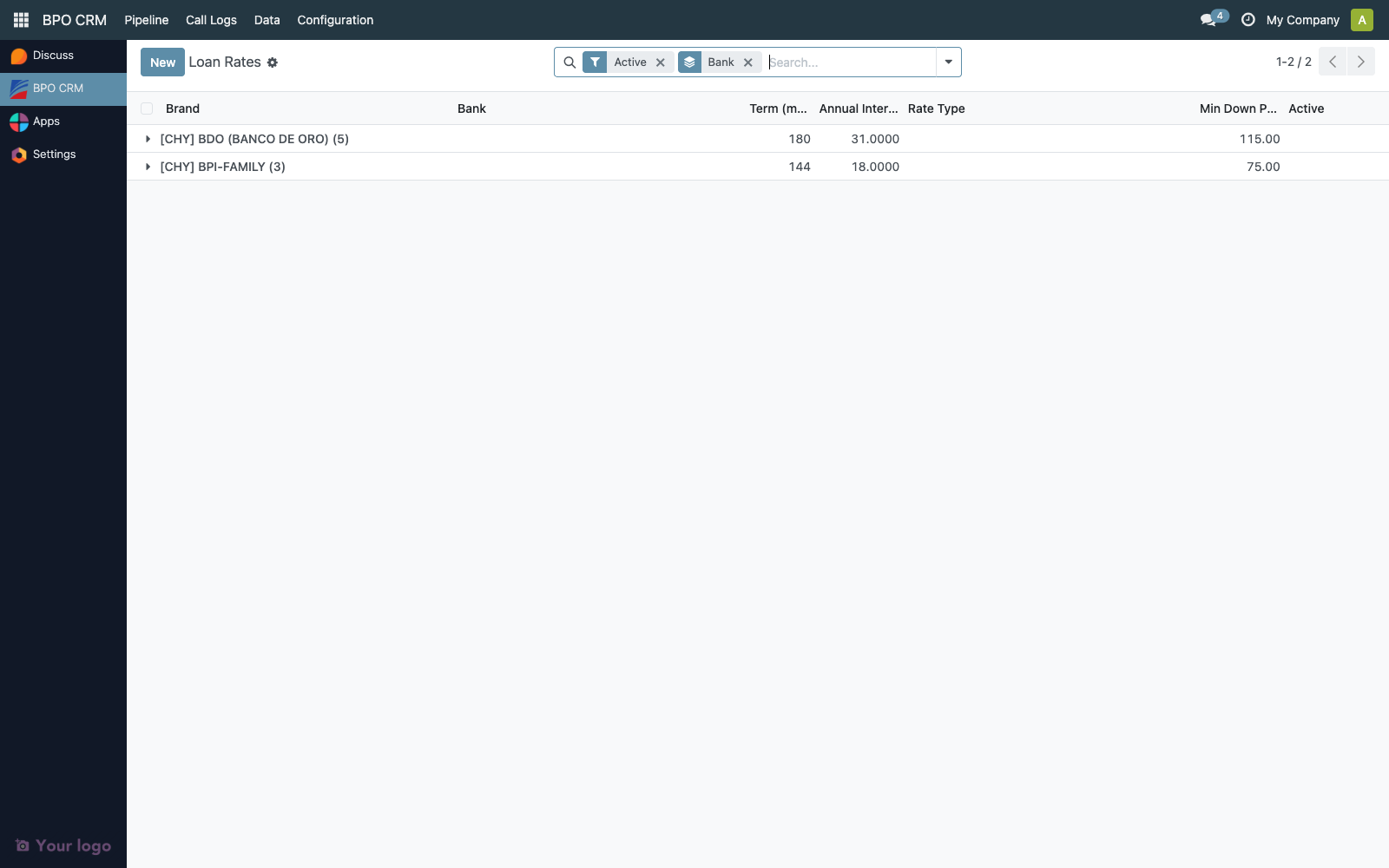
The default view groups by Bank and shows every active rate row across every brand. Useful for:
- Bulk reviewing the rate sheet for a quarter-end audit
- Spotting banks with unusually high or low rates compared to peers
- Counting how many term options each bank offers
| Column | Description |
|---|---|
| Brand | The brand whose distributor pushed this row |
| Bank | The parent crm.bank |
| Term (months) | Loan term |
| Annual Interest % | Headline rate |
| Rate Type | Add-On or Effective |
| Min DP % | Bank's minimum down payment |
| Active |
The search bar exposes filters for Active, Add-On, and Effective, plus group-by Brand or Bank.
Sync paths
Identical to banks — see Banks → Sync paths:
- Scheduled cron (every 6 hours, all brands)
- Sync Banks button on the brand form (one brand)
- Update Bank Rates button on the lead Quotation tab (all brands, agent-triggered via sudo)
All three paths upsert by (bank_id, term_months, rate_type) on first run, then by distributor_rate_id on subsequent runs. Existing rows are updated in place; missing-on-distributor rows are not deleted (they're left in place locally so historical lead references still resolve).
Access matrix
| Group | Read | Sync | Edit Locally | Delete |
|---|---|---|---|---|
| BPO Agent | ✅ | ✅ (Update Bank Rates) | ❌ | ❌ |
| BPO Supervisor | ✅ | ✅ | ❌ | ❌ |
| BPO Manager | ✅ | ✅ | ✅ | ✅ |
Same restrictions as banks. Local edits are overwritten on the next sync.
Audit trail
Each rate row carries create_uid, create_date, write_uid, write_date. After the first sync, these are usually OdooBot (the cron runs as superuser).
When an agent picks a rate row in the calculator, the lead's quotation_bank_rate_id is a tracked field — every change appears in the lead's chatter with the timestamp and user. After endorse, this field is locked (see Quotation Calculator → Lock on endorse) so the rate the dealer ultimately receives is provably the rate the customer agreed to.
For a closed sale, an auditor can reconstruct the financing terms by:
- Open the won lead
- Look at the Quotation tab — the financing block is read-only and shows the snapshot at endorsement time
- Look at the Endorsement tab — the dealer-side
dealer.crm.leadlink contains the same financing snapshot underbpo_quotation_*fields - The customer's emailed PDF (attached to the lead's chatter via Email Quotation) is the third source of truth
Typical audit questions
"How many leads were quoted at the highest rate this quarter?"
- Pipeline → All Leads → Filter
quotation_interest_rate >= Xanddate_endorsedin the quarter range. Group by Bank.
"Did the dealer-side SO match the BPO quotation rate?"
- Open the BPO lead's Endorsement tab → click the dealer lead link → BPO Origin tab →
bpo_quotation_interest_ratefield. Compare against the BPO side'squotation_interest_rate. They must match — both are populated by the same payload at endorse time.
"Who changed the rate after the customer received the PDF?"
- The BPO lead's chatter shows every change to
quotation_bank_rate_idwith the user and timestamp. After endorse, no further changes are possible (the lock raises immediately).
Retention
Rate rows are never auto-deleted. Sync upserts in place — historical leads keep their quotation_bank_rate_id reference even if the rate row is later updated. Old quotes show the rate as it was at quotation time because the snapshot fields (quotation_interest_rate, quotation_rate_type, etc.) are stored, not just related.
Troubleshooting
| Symptom | Likely cause |
|---|---|
| Loan Term dropdown empty after picking a bank | The bank has no crm.bank.rate rows. Distributor admin needs to add at least one row. |
| Rate row appears under the wrong brand | The bank itself is under the wrong brand. Check bank_id.brand_id — fix on the distributor side, then re-sync. |
| Monthly amortization seems off vs the bank's published table | Rate type mismatch — verify the rate row's rate_type matches what the bank actually quotes. Add-on vs effective produce very different monthlies for the same advertised %. |
| Two rate rows for the same bank/term/type | Should be impossible — the unique constraint blocks it. If you see it, check whether one is archived (active=False). |
| Sync brings down 0 rates for a bank | The distributor's cheryapp.bank.rate model isn't accessible (older branch) or the bank really has no rates yet. The sync logs a warning and continues. |
| Min DP % is 0 on every row | The distributor's rate sheet didn't populate it. Default is 20%. Ask the distributor admin to fill in the column. |