Lead Intake
A lead (crm.lead) represents a single customer interest in buying a vehicle. The BPO CRM receives leads through two channels:
- Automatic — a scheduled job pulls new records from each brand's distributor every few minutes.
- Manual — an agent creates a lead directly from the Open Leads kanban.
Both channels produce the same crm.lead record. Downstream processing (claim, work, close) is identical.
Automatic intake from distributors
What gets pulled
For every active brand with a working Distributor Connection (see Brands), the sync reads two remote models:
| Remote model (Odoo 12) | Lead source assigned | Purpose |
|---|---|---|
cheryweb.quotation | source_web_quotation | Website quotation / inquiry form |
cherywebsite.test.drive | source_web_test_drive | Website test-drive booking form |
Only remote records with status in ('pending', 'sent') are fetched, up to 100 per run, per model, per brand. After a successful import, the remote record is written back with status = 'synced' so it is not pulled again.
Schedule
The sync is a scheduled action (ir.cron) named CRM: Sync Distributor Campaign Leads and runs every 5 minutes by default.
To change the cadence, open Settings → Technical → Scheduled Actions and edit the entry. Interval is stored on the cron record (interval_number / interval_type), not per-brand.
:::info Why the sync button is unnecessary for normal operation The cron is the normal import path. The Sync Dealers and Sync Vehicle Models buttons on the Brand form are manual, configuration-time tools — you use them once during setup and when the distributor's catalog changes. You do not need to press a "sync leads" button; the cron handles that. :::
What each imported lead has pre-filled
From the distributor record:
| Lead field | From remote |
|---|---|
contact_name | first_name + last_name |
email | email |
mobile | mobile (falls back to 'N/A' if empty) |
brand_id | The brand whose cron run pulled the record |
dealership_id | Resolved from dealer_id on the remote (auto-created if missing) |
vehicle_model_id | Resolved from model_id on the remote (auto-created if missing) |
source_id | Web Quotation or Web Test Drive depending on remote model |
preferred_date | Only for test-drive leads |
user_id | Empty — lead arrives unclaimed |
stage_id | First stage (New) |
Inbound leads always arrive with user_id = False. That's what puts them on the unclaimed-pool kanban — see Claiming a Lead.
Customer-level deduplication
Even though every distributor record is unique, the same customer often submits multiple forms (e.g. a quotation and a test-drive, or two quotations on different days). To avoid fragmenting the pipeline:
After fetching a remote record, the sync looks for an open local lead matching:
contact_name ilikefrom the remote full nameemail =remote emailmobile =remote mobile
Brand is not part of the match — a customer shopping across brands still consolidates onto one lead.
When a match is found:
- The existing lead gets a chatter note recording the duplicate source + remote id.
- The remote record is marked
syncedupstream. - No new lead is created.
Matching requires both email and mobile on the remote record. Leads missing either field always create a new record.
"Open" means is_won = False AND is_lost = False AND active = True. A closed lead does not block a new one — a returning customer gets a fresh pipeline entry.
Manual intake
Agents can create leads directly for walk-ins, inbound calls, or any channel not wired into a distributor.
- BPO CRM → Pipeline → Open Leads
- Click New
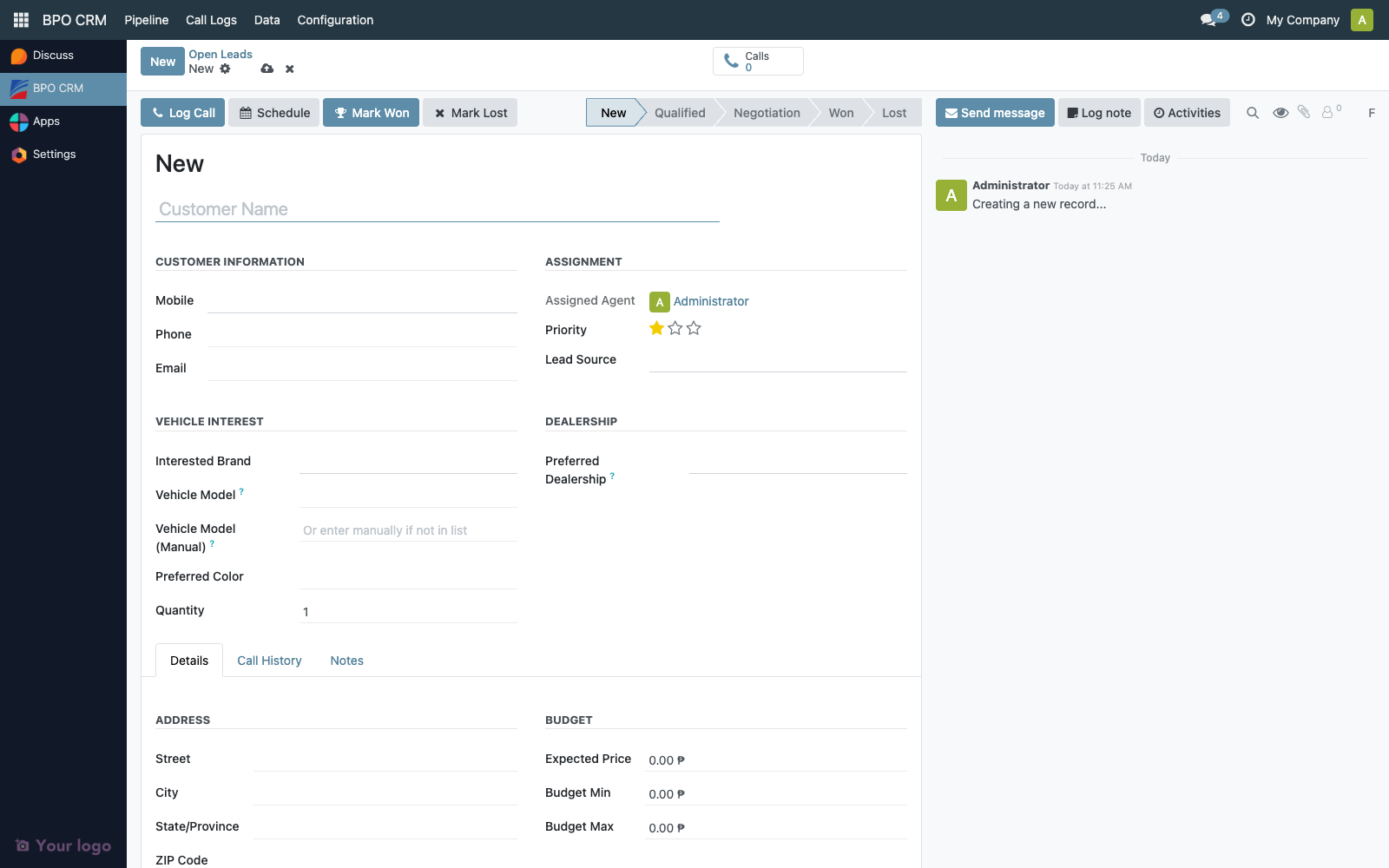
Required fields:
| Field | Notes |
|---|---|
| Customer Name | Display name of the lead contact |
| Mobile | Phone number — also used for customer dedup |
| Interested Brand | Must exist as a crm.brand |
Everything else (email, vehicle model, preferred color, budget, address) is optional but should be captured whenever possible.
:::tip Manual leads and dedup Customer-level dedup is only applied to distributor-synced leads. A manual lead is always created as-is, even if an open lead already exists for the same customer. If the agent needs to consolidate, they should move the note to the existing lead and archive the duplicate. :::
The Open Leads kanban — default landing view
BPO CRM → Pipeline → Open Leads is the default workspace for the BPO floor. It shows only leads where:
user_id = False(unclaimed)is_won = Falseis_lost = False
The view is a kanban grouped by Brand, so the floor can see at a glance how many pending leads each brand has and triage accordingly.
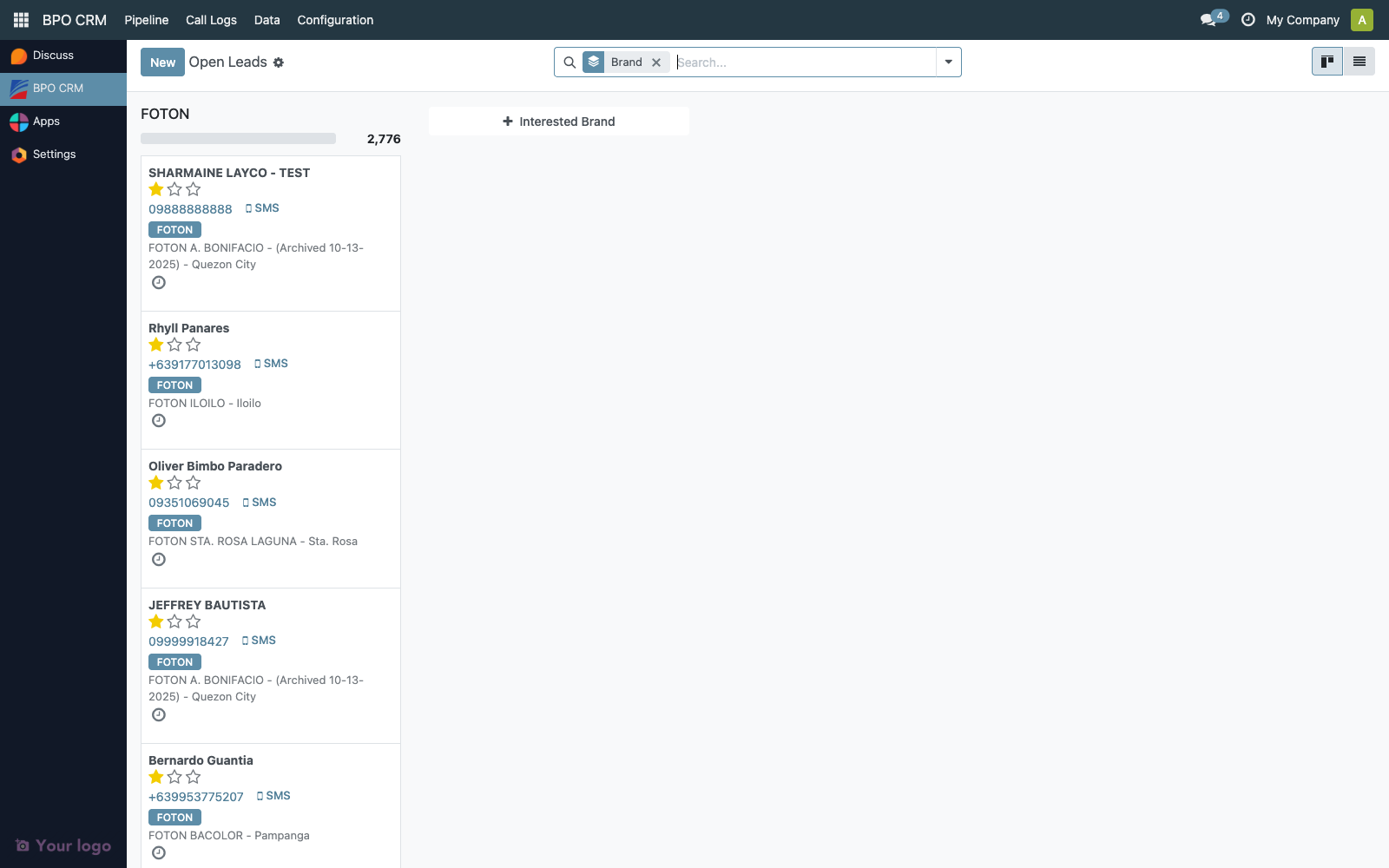
| UI element | Meaning |
|---|---|
| Column | One per brand. Count in the header = leads waiting. |
| Card | One per unclaimed lead. Shows customer name, vehicle, and source badge. |
| Avatar (bottom-right) | Empty — no agent assigned yet. |
| "Claim Lead" button | Primary action on every open card and on the form header. |
Any BPO user (Agent, Supervisor, Manager) sees the same unclaimed pool here. The instant someone claims a lead, it disappears from everyone else's Open Leads view.
Troubleshooting
| Symptom | Likely cause |
|---|---|
| New website quotations never appear | Brand's distributor connection is broken — open the brand, click Test Connection. |
| Cron runs but some remote models are skipped | Service account lacks access on cheryweb.quotation or cherywebsite.test.drive. Check server log for Remote model … not found or inaccessible. |
| A known customer's new quote isn't showing up | It was deduped into an existing open lead — check the chatter on that lead for the "Duplicate inbound lead" note. |
Lead created with contact_name = 'Unknown' | Remote record had no first_name / last_name. Clean up on the distributor side. |
Lead created with mobile = 'N/A' | Remote record had no mobile. These bypass customer dedup and always create a new lead. |