Working a Lead
Once claimed, a lead moves through the pipeline. This page walks through the day-to-day actions an agent performs: logging calls, scheduling visits, and closing the lead as Won or Lost.
The pipeline at a glance
  New ──▶ Qualified ──▶ Negotiation ──▶ Won ──▶ (SO pushed to dealership)
                                    └─▶ Lost  (with reason)
See Stages for the configuration side — this page covers the operational side.
My Pipeline kanban
BPO CRM → Pipeline → My Pipeline is an agent's personal workspace. It's a kanban grouped by Stage, filtered to user_id = <self>.
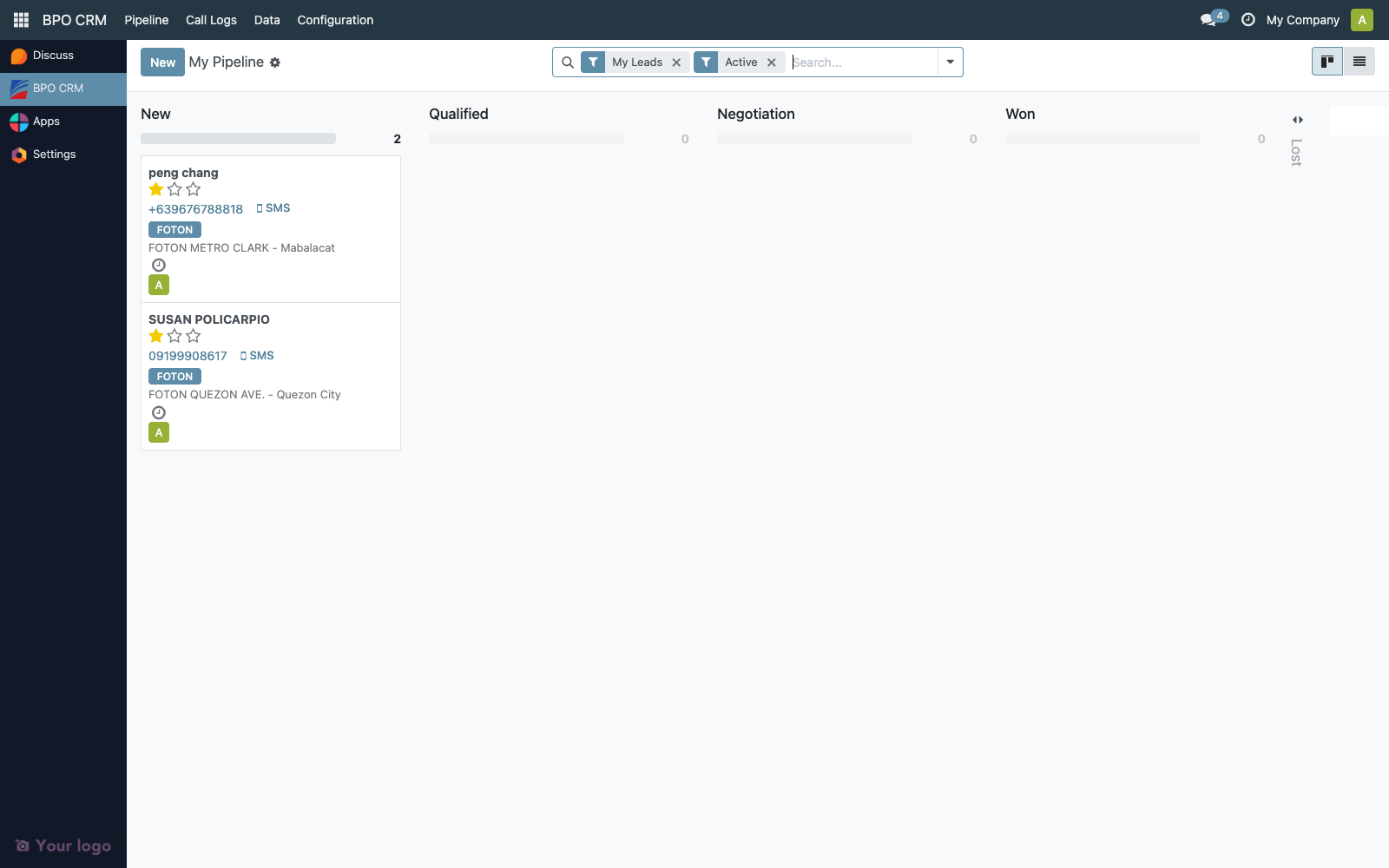
Drag cards between columns to advance stages, or click the stage statusbar on the lead form. Advancing to the Won stage triggers the dealer SO push automatically (see below).
Forward-only stage progression
Leads follow a strict one-step-forward pipeline. This rule is enforced on the server, so it applies to both the statusbar on the lead form and the kanban drag-and-drop:
| From | Only allowed next open stage |
|---|---|
| New | Qualified |
| Qualified | Negotiation |
| Negotiation | (use Mark Won or Mark Lost) |
Skipping (e.g. New → Negotiation) and reverting (e.g. Qualified → New) both raise an error:
Leads can only move forward one stage at a time. From "New" the only allowed next stage is "Qualified". Use the Mark Won or Mark Lost buttons to close the lead instead.
:::info Closing a lead is never blocked The one-step rule applies only to transitions between open stages. Moving a lead into a Won or Lost stage is always allowed, no matter where it is, because those moves are normally triggered from the Mark Won / Mark Lost header buttons which can be pressed from any open stage. :::
Why this exists
Management wanted a predictable funnel for reporting and coaching. Every stage transition is a conversation milestone with the customer — qualifying the lead, then negotiating, then closing. Allowing agents to skip or unwind stages made the pipeline history unreliable and hid the work that still needed to happen.
Admin override
There is no UI to bypass the rule. In rare cases (data migration, fixing a stuck lead after an incident), a manager can override via the Odoo shell or a server action with an explicit context flag:
lead.with_context(skip_stage_transition_check=True).write({'stage_id': target_stage.id})
This is intentionally out of reach for day-to-day use — if you find yourself reaching for it, ask whether the lead should instead be marked Lost and a fresh one created.
Lead form header — available actions
Once claimed, the lead's header exposes:
| Button | What it does |
|---|---|
| Log Call | Opens the call log wizard — capture duration, result, and next action |
| Schedule Visit | Creates a calendar activity for an on-site or showroom visit |
| Mark as Won | Moves the lead to the Won stage and pushes a Sales Order to the dealership |
| Mark as Lost | Opens the Lost wizard to capture a reason before moving the lead to the Lost stage |
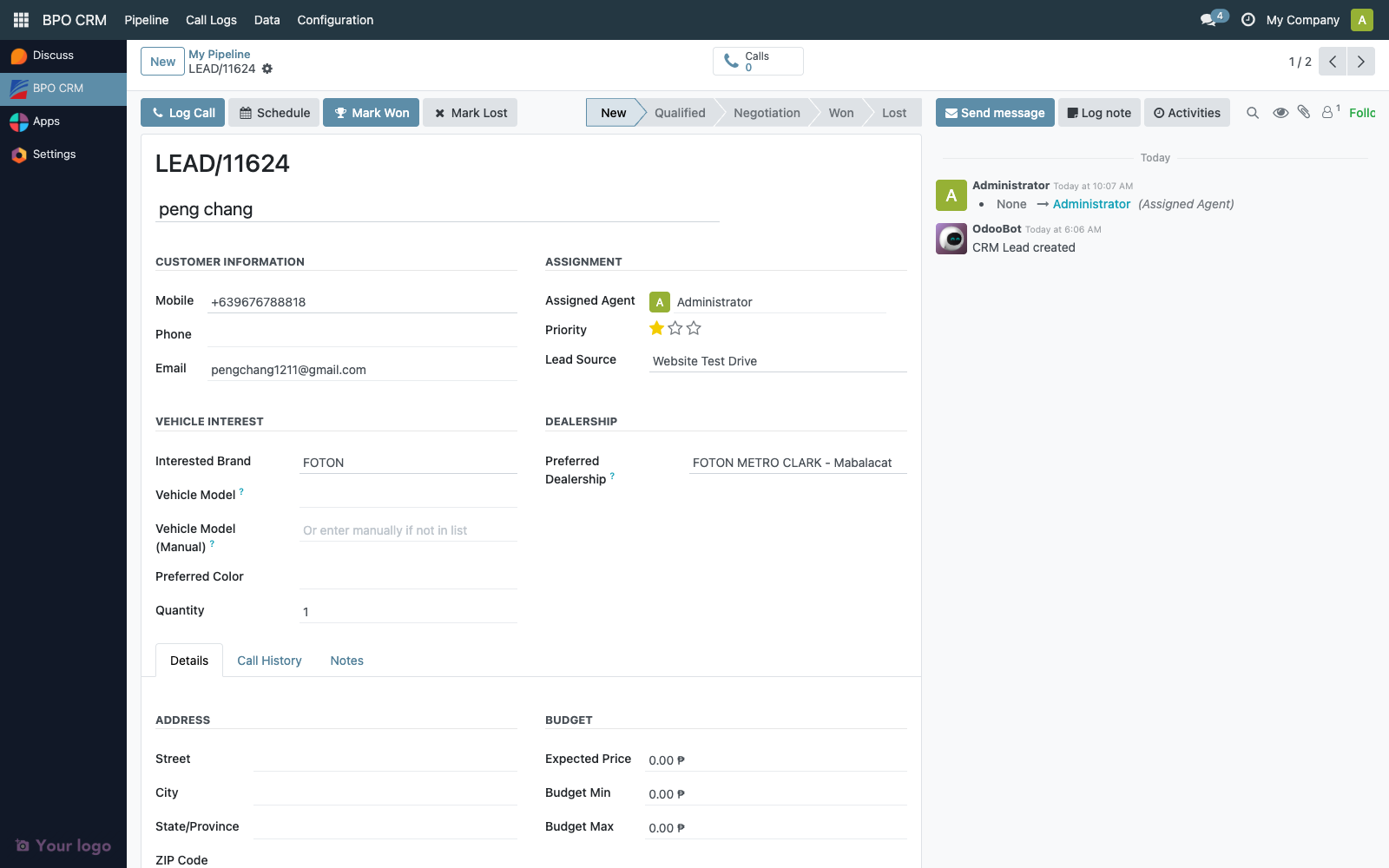
The Claim Lead button is no longer visible once the lead is claimed.
Call logging
Click Log Call to open the call-log wizard.
| Field | Notes |
|---|---|
| Duration | Minutes. |
| Call Result | Answered / No Answer / Busy / Voicemail / Wrong Number. |
| Summary | Free text — becomes a chatter message on the lead. |
| Next Activity | Optional scheduled follow-up (activity mixin). |
Each call log is stored as a crm.call.log linked to the lead, visible under BPO CRM → Call Logs.
Marking as Won
Moving a lead into the Won stage (either by clicking Mark as Won or by dragging the kanban card) triggers the Won flow:
- Validate the lead's
dealership_idhas an Odoo Connection configured. - Connect to the dealer's Odoo 18 instance via JSON-RPC.
- Look up or create a
res.partnerfor the lead's customer. - Create a
sale.orderon the dealer instance referencing the lead's vehicle model. - Write the remote SO reference back to the lead (
dealer_so_name). - Send a notification email to the dealership manager (
manager_email). - Show a success toast with the SO number.

If any step fails:
- The stage change is rolled back — the lead stays in Negotiation.
- The error is surfaced in the chatter.
- The lead's
dealer_so_nameremains empty.
Most failures are connectivity or permission issues on the dealer side — check the dealership's Odoo Connection tab and use Test Connection first.
Marking as Lost
Clicking Mark as Lost opens a wizard — the lead cannot be moved to Lost without capturing a reason.
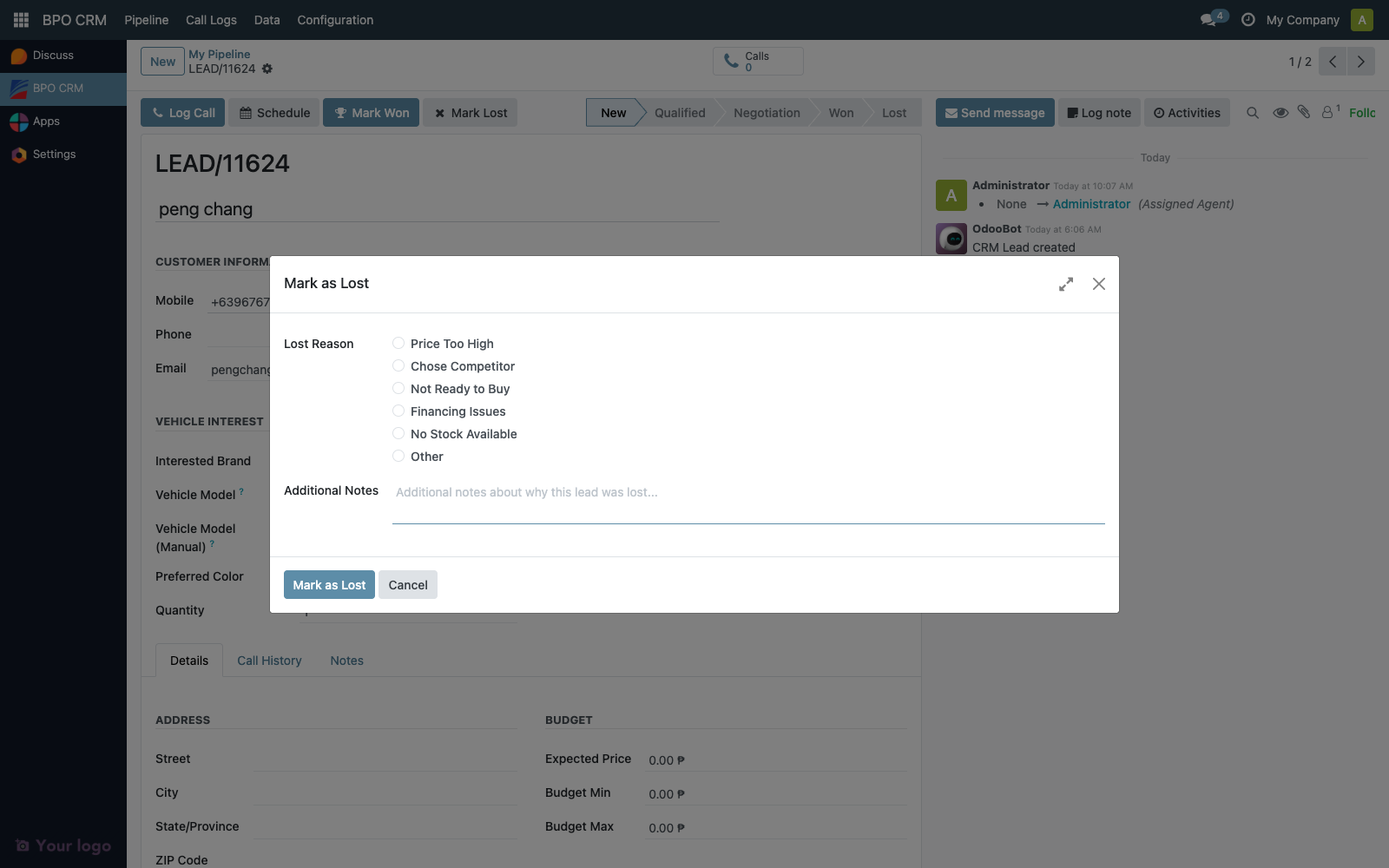
| Field | Notes |
|---|---|
| Lost Reason | Selection: Price, Competitor, Timing, Model Unavailable, Financing, Other |
| Notes | Free text explaining the specifics |
On submit, the lead:
- Moves to the Lost stage (folded in the kanban).
- Gets a chatter entry with the reason and notes.
- No dealer push is performed.
Lost leads stay on record for reporting. They do not block a returning customer from creating a new open lead.
Following up with activities
Every lead uses Odoo's standard activity mixin. Schedule follow-up calls, meetings, or tasks via the activity chip next to the chatter. Activities show up on:
- The agent's home dashboard.
- Each lead card in the kanban (red/yellow/green activity pill).
- Odoo's reminder emails.
What happens if the customer calls back later
Returning customer on a closed lead (Won or Lost): the distributor cron (or a manual create) produces a new lead. Customer-level dedup only applies to open leads — see Lead Intake.
Returning customer on an open lead: the new contact is merged into the existing lead's chatter. The agent who owns the lead sees a new chatter entry with the duplicate source info.
Troubleshooting
| Symptom | Likely cause |
|---|---|
| "Mark as Won" errors with "No won stage configured" | No crm.stage has is_won = True. Fix via Configuration → Stages. |
| "Mark as Won" fails creating the SO | Dealer instance unreachable or service account lacks sale.order create rights. Test from the dealership form. |
| Dealer manager not notified | manager_email empty on the dealership, or dealer outbound mailer unconfigured. |
| Lost wizard won't close | Required fields missing — Lost Reason must be set. |
| Kanban drag to Won does nothing | Stage has is_won = True but dealership is not configured — check lead's dealership_id. |