Call Logs
Every customer call — inbound or outbound — should be logged against the lead it's about. The dealer CRM exposes two entry points for this: the Log Call button on the lead form, and the standalone Dealer CRM → Call Logs menu. Both write to the same model (dealer.crm.call.log), both are tracked for audit, and both surface on the lead they belong to.
Why log every call
- Hand-off continuity. If an agent goes on leave, the next person picking up the lead can read the history without guessing what was discussed.
- Accurate stage advancement. Agents move a lead from Qualified to Negotiation based on what's been said. The call log makes the reasoning visible.
- Audit pulls. Auditors verifying agent productivity pull call logs filtered by agent + date range. See Audit trail.
- Dispute resolution. If a customer claims "nobody called me back", the voicemail entry is evidence.
Log a call from the lead form
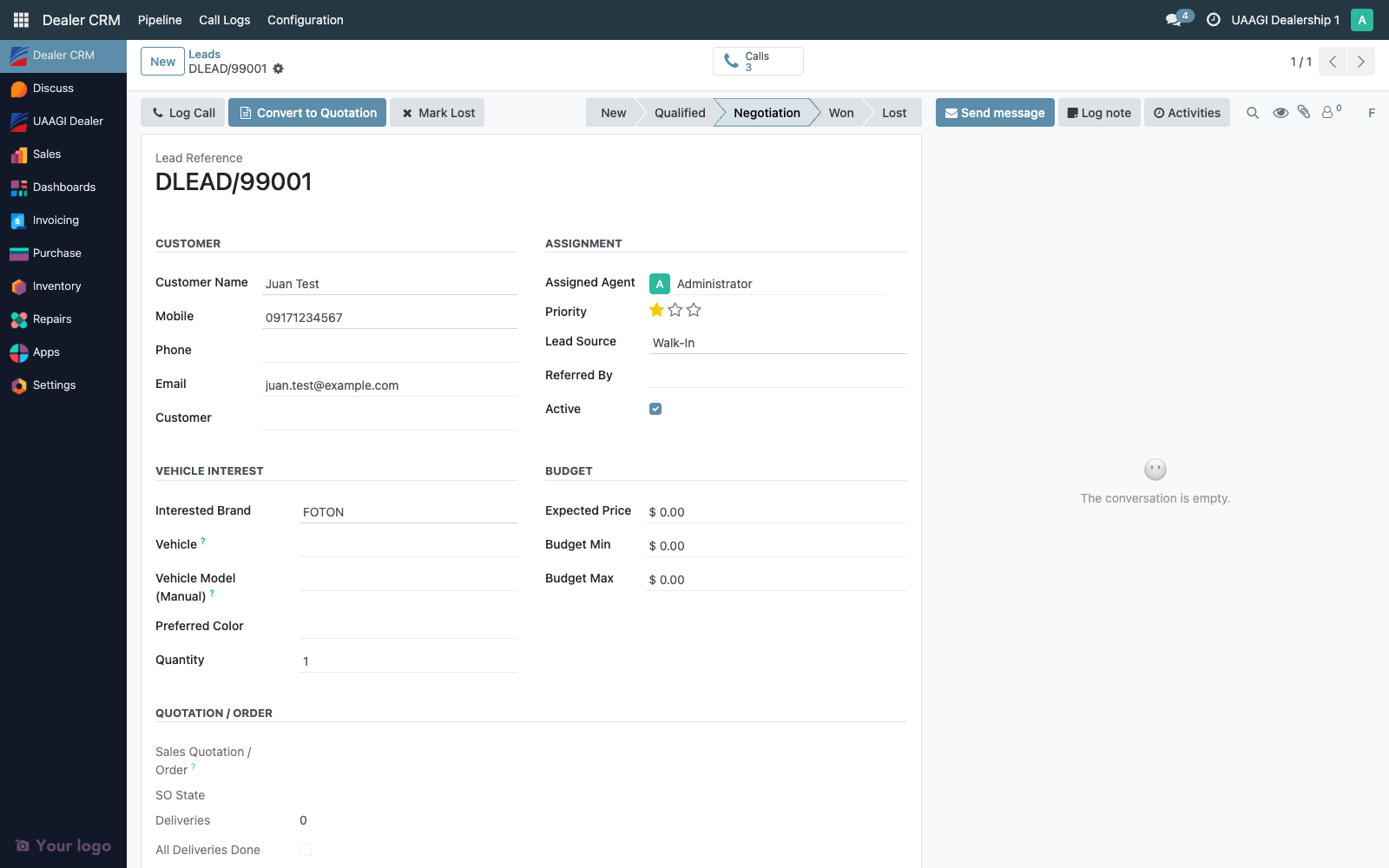
- Open the lead (Dealer CRM → Pipeline → My Pipeline or All Leads, then click the card)
- Click Log Call in the form header
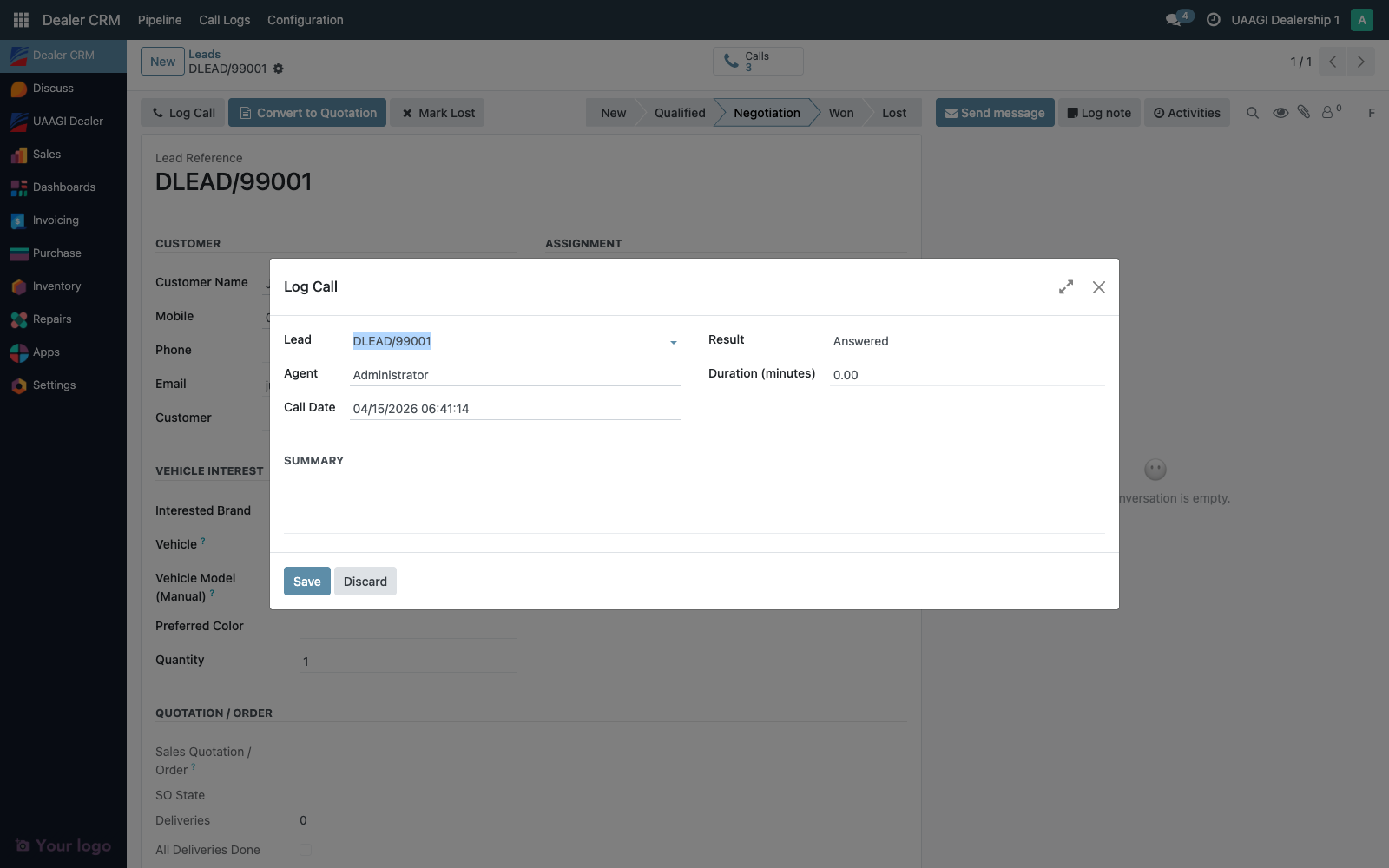
- Fill in the wizard
- Click Save — the wizard closes, the call log is created linked to this lead, and the lead's Calls stat button increments by one.
Wizard field reference
| Field | Type | Notes |
|---|---|---|
| Lead | Many2one → dealer.crm.lead | Pre-filled from context. Hidden if opened from a lead form. |
| Agent | Many2one → res.users | Defaults to the current user. Editable — set this to a different agent if logging on their behalf, but be aware that create_uid will still record the logger. |
| Call Date | Datetime | Defaults to now. Adjust if you're backfilling. |
| Duration (minutes) | Float | How long the call lasted. Enter 0.5 for 30 seconds, 4.5 for 4 minutes 30 seconds. |
| Result | Selection | Answered / No Answer / Busy / Voicemail / Wrong Number. Drives reporting. |
| Summary | Text | Free-form. One or two sentences is usually enough — capture what was discussed and the next action. |
None of these are strictly required at the DB level, but auditors will flag missing Summary entries, so treat it as required in practice.
The Calls stat button
Every lead form shows a Calls stat button in the button box at the top of the form. The number is the count of linked call logs.
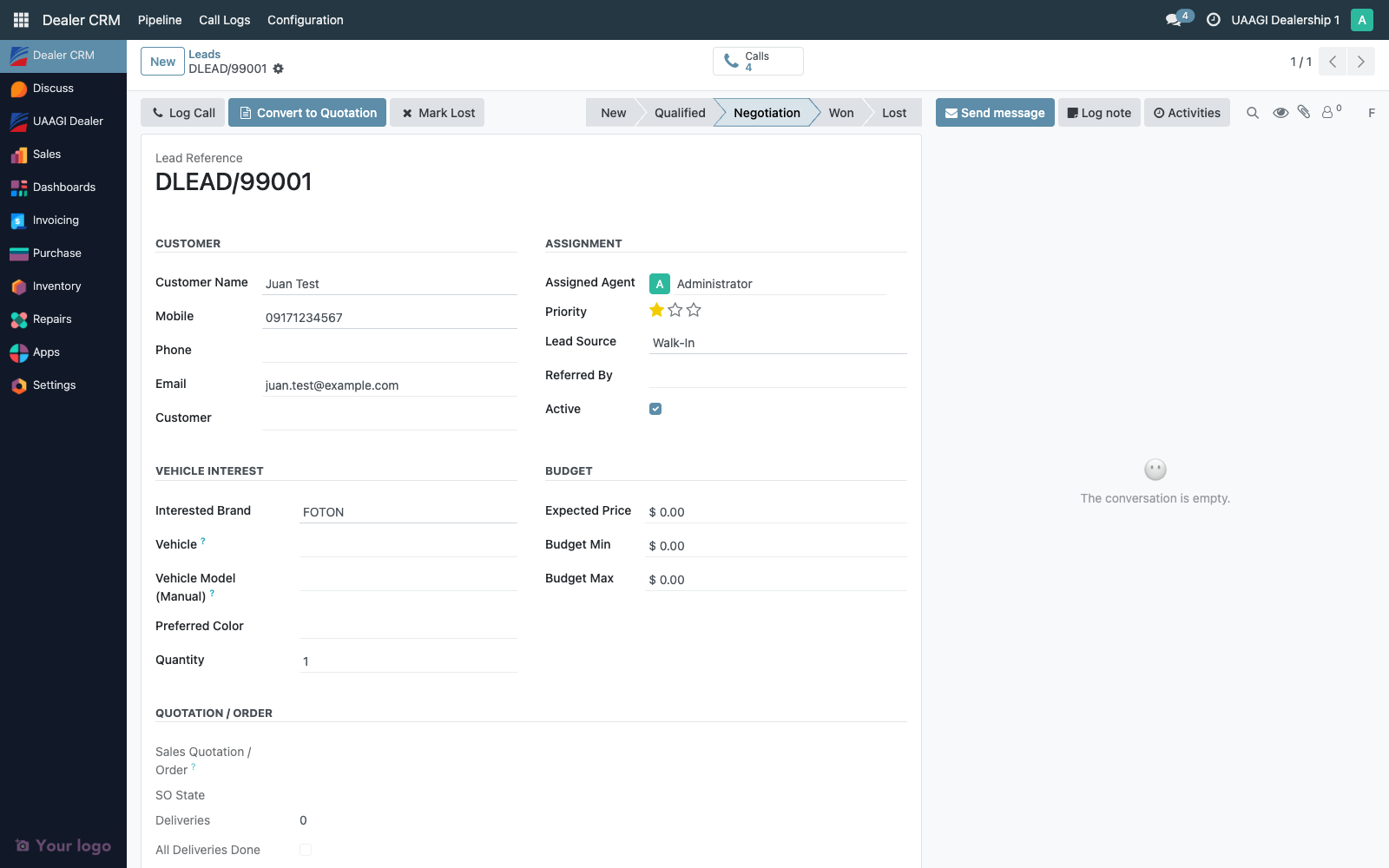
Click it to drill into the list of calls for that lead only. From there you can click any row to see the full call log form, or add a new one via the list's New button.
The standalone Call Logs menu
Dealer CRM → Call Logs opens the global list of every call log across every lead.
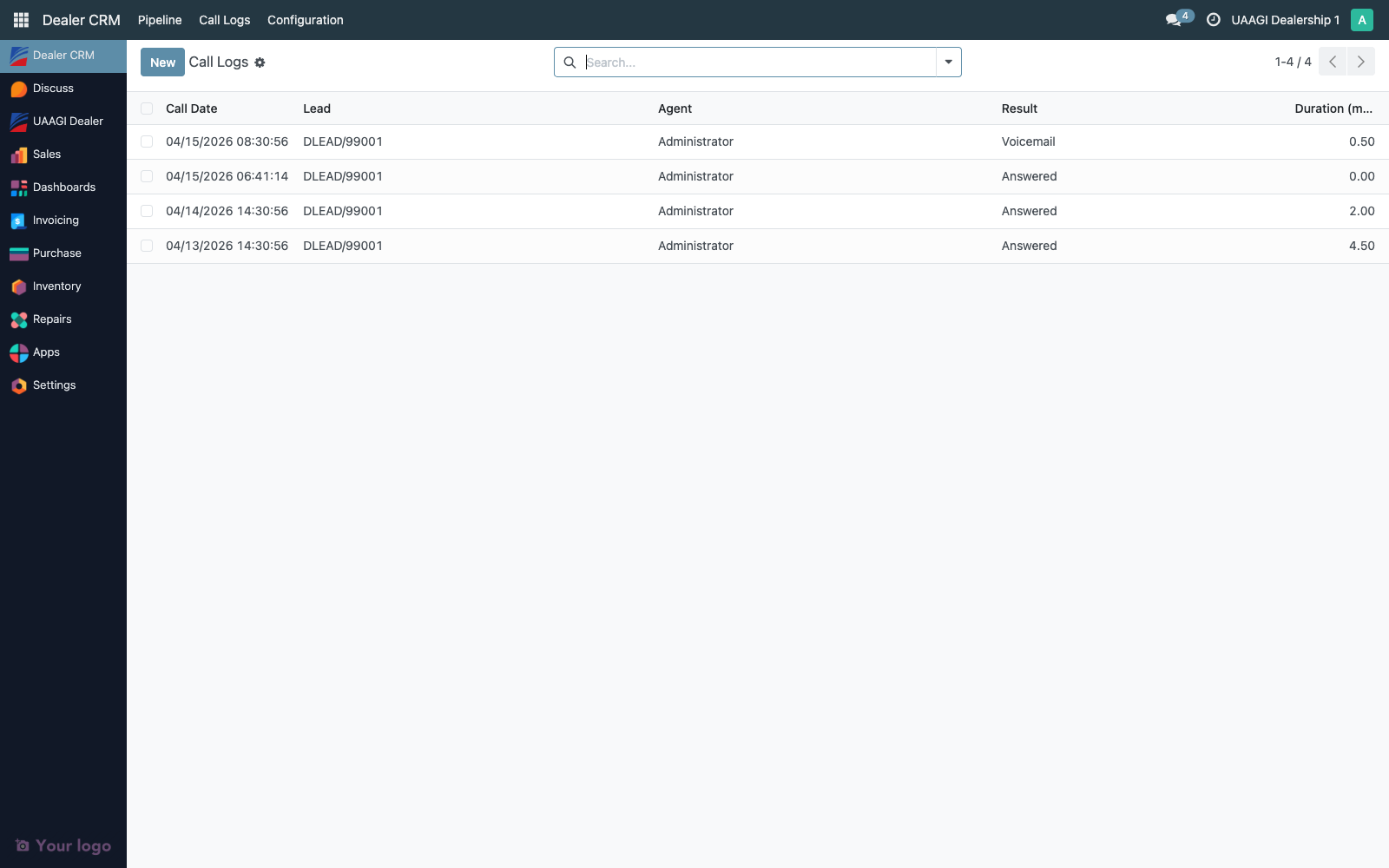
This is the view auditors care about. Use the search bar and built-in filters to narrow:
- By agent — search for a specific user
- By date range — the search bar accepts natural date filters ("this week", "last month")
- By result — filter to
voicemailto find leads that need a callback
Group by Agent or Call Date for daily/weekly rollups — handy for "how many calls did each agent log this week".
The call log form
Click any row in the stat-button list or the standalone menu to open the form.

Fields are the same as the wizard, editable by the agent who logged them or by any dealer manager. The Lead back-link opens the source lead directly.
Editing and deleting
| Action | Dealer User | Dealer Manager |
|---|---|---|
| Create | ✅ | ✅ |
| Read (own) | ✅ | ✅ |
| Read (all) | ✅ | ✅ |
| Update (own) | ✅ | ✅ |
| Update (others) | ❌ | ✅ |
| Delete | ❌ | ✅ |
Users can update their own call logs in case of a typo, but deletion is blocked for dealer users — the audit trail stays intact. Dealer managers can delete, but deletion events are themselves logged on the parent lead's chatter, so deletions are still traceable.
Audit trail
dealer.crm.call.log records carry Odoo's standard bookkeeping fields automatically:
| Field | Meaning |
|---|---|
create_uid | User who created the call log (always the logger, regardless of who the Agent field points at) |
create_date | When the call log was created (server time) |
write_uid | Last user to edit the call log |
write_date | When the last edit happened |
These four fields are the auditor's primary evidence: they let you verify that Agent X actually logged the call at Time Y, independent of any field the user can edit.
On the parent dealer.crm.lead, the call_log_ids one2many tracks every call log. The lead's chatter doesn't mirror individual call-log contents (to avoid noise), but the Calls counter updates automatically, and linked call logs show under the Calls tab list.
Typical audit pulls
"How many calls did agent X log last week?"
- Dealer CRM → Call Logs
- Filter: Agent = X, Call Date between last Monday and Sunday
- Count the rows. For an aggregate, Group By → Result.
"Show every voicemail we left on leads that went on to Lost."
- Dealer CRM → Pipeline → All Leads → Filter Lost
- Export the lead
names - Dealer CRM → Call Logs → Filter
lead_id in [...]andResult = Voicemail
"Audit a specific dispute: customer says we never called them back on 2026-04-10."
- Open the dealer lead from the customer's name
- Click the Calls stat button
- Scan call logs on or after 2026-04-10.
create_dateis the source of truth for when the agent logged it — notcall_date, which the agent can backdate.
Retention
Call logs are never auto-deleted. Archiving the parent lead (active = False) does not touch its call logs — they remain queryable. A dealer manager deleting a call log is permitted by design, but it leaves a chatter entry on the parent lead recording the deletion user + timestamp.
If your compliance regime requires immutability, remove the Delete permission from group_dealer_manager on the dealer.crm.call.log access rule. That change is a one-line edit in security/ir.model.access.csv and a module upgrade.