Compensation & Benefits
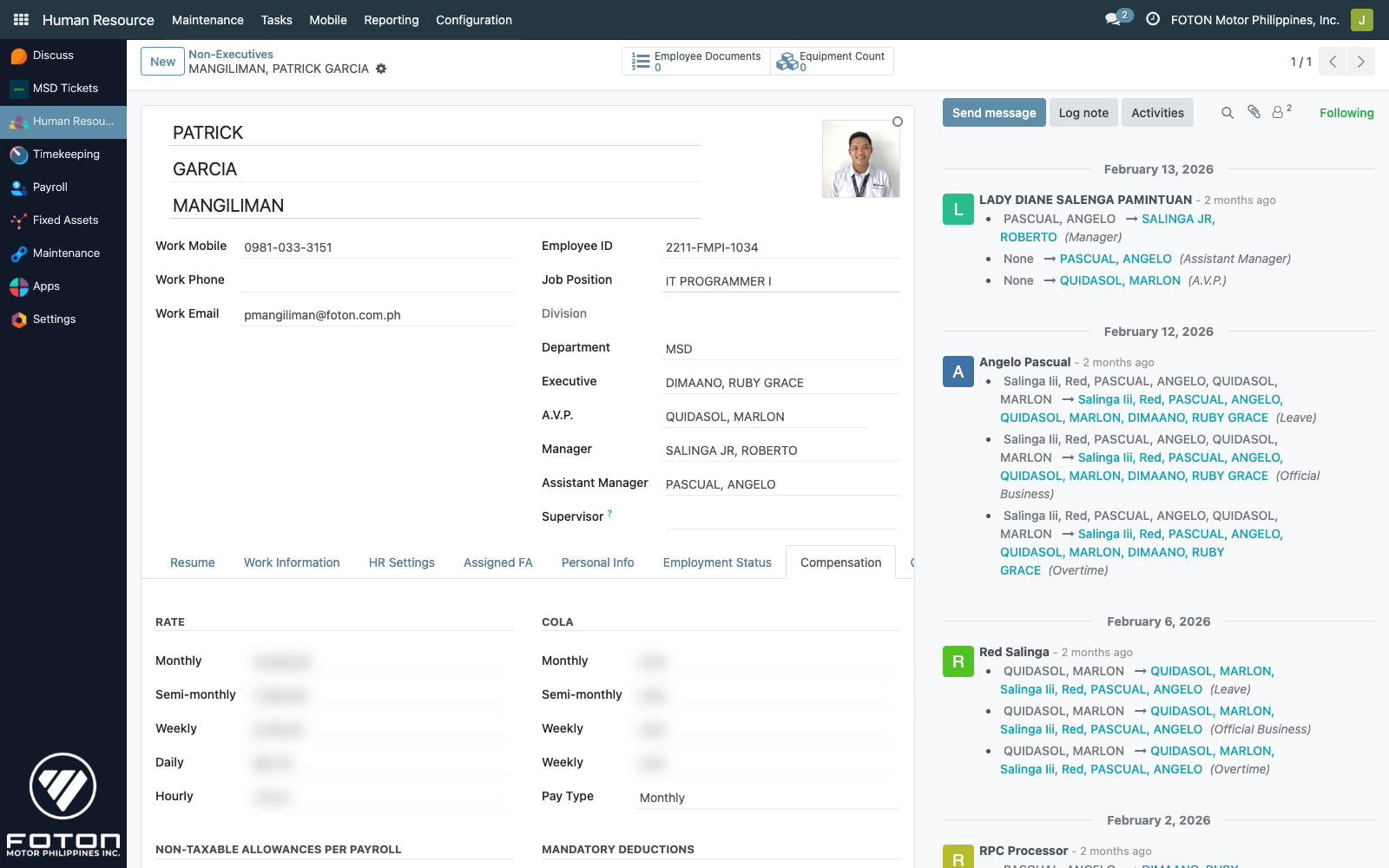
This is the most sensitive tab on the employee form. It holds every rate, allowance, and mandatory deduction that feeds payroll. Access is restricted to the Compensation & Benefits and MSD Administrators groups (groups="hr17.hr_compen_ben,hr17.msd_administrators" on the view).
Compensation & Benefits specialists, payroll officers, MSD administrators.
Every amount field on this page is blurred in the screenshots. The blur is applied programmatically — it is not a visual trick; the actual values remain readable to the logged-in user. Documentation is about where the fields are and how the computation works, not what any specific employee earns.
The form tab
Human Resource ▸ Maintenance ▸ Employees ▸ (open any employee) ▸ Compensation
The tab is labeled simply Compensation in the Odoo form view. This doc uses "Compensation & Benefits" as the broader topic name since it covers both the rate-driven compensation fields and the related Other Benefits tab.
Rate structure
An employee has five rate granularities, all stored on hr.employee:
| Field | Field name | Notes |
|---|---|---|
| Monthly | monthly_rate | The authoritative figure on a monthly payroll. |
| Semi-Monthly | semi_monthly_rate | Half-month payout. |
| Weekly | weekly_rate | Weekly payout. |
| Daily | daily_rate | Authoritative for daily-paid employees; used in per-day attendance calculations. |
| Hourly | hourly_rate | Drives OT and partial-day pay. |
Rate cascade
When the HR admin edits Monthly, the other four fields auto-cascade (models/hr_employee.py:243–250):
semi_monthly_rate = monthly_rate / 2
weekly_rate       = semi_monthly_rate / 2     # = monthly / 4
daily_rate        = monthly_rate / work_days_per_year * 12
hourly_rate       = daily_rate / 8
work_days_per_year comes from the employee's res.company (default 261 in most BUs — check Settings ▸ Companies ▸ (your BU)). Because daily rate divides by workdays per year × 12, editing work_days_per_year changes the daily/hourly rate for the whole BU.
The onchange only fires when the HR admin edits the Monthly field interactively. Importing rates through the Odoo import tool, API writes, or edits to daily_rate alone will not cascade — the values stay exactly as written. This is intentional (daily-paid employees often need the daily rate set directly), but means manual edits to Monthly are the supported path.
COLA
Cost-of-Living Allowance, mirrored at each rate granularity:
monthly_cola,semi_monthly_cola,weekly_cola,daily_cola,hourly_cola
These fields do not auto-cascade. Each is set independently — COLA structures often don't follow the same ratio as base rate (e.g. a flat daily COLA regardless of monthly).
Allowances
Three named allowance slots:
| Field | Field name |
|---|---|
| Miscellaneous | allow_misc |
| Meal | allow_meal |
| Transportation | allow_transpo |
Allowances are added to gross pay in the payroll computation (see Payroll Processing).
Project TM (Taxable Monthly)
| Field | Field name | Purpose |
|---|---|---|
| Monthly TM | tm_monthly | Projected taxable monthly for WHT bracket lookup |
| Semi-Monthly TM | tm_semi_monthly | For semi-monthly payroll |
| Weekly TM | tm_weekly | For weekly payroll |
These are the values the withholding-tax logic uses to locate the correct bracket in the WHT table. They are not auto-computed — the HR admin sets them based on the employee's expected taxable compensation after non-taxable items are excluded.
Mandatory deductions
Three toggles enable/disable the standard Philippine government contributions for this employee:
| Toggle | Field | Meaning |
|---|---|---|
| S.S.S. | ded_sss | Social Security System — bracket computed against SSS table |
| PhilHealth | ded_phic | PhilHealth — amounts set explicitly below |
| H.D.M.F. | ded_hdmf | Home Development Mutual Fund (Pag-IBIG) — amounts set explicitly below |
PhilHealth amounts
When ded_phic=True, these two fields set the per-period amounts:
ded_phic_er— employer shareded_phic_ee— employee share
These are not looked up from the philhealth_table automatically — the HR admin sets them based on the bracketed percentage. See PhilHealth for the table.
HDMF amounts
When ded_hdmf=True:
ded_hdmf_er— employer share, default200ded_hdmf_ee— employee share, default200
The defaults reflect the statutory minimum. For voluntary contributions above the minimum, the HR admin overrides the defaults here.
SSS
SSS has no per-employee amount field — the monthly contribution is looked up at payroll time from the sss_table using the employee's current monthly_rate. See SSS for bracket maintenance.
Pay type
pay_type is a selection field (daily | monthly, default daily) that decides which payroll wizard processes the employee. The Non-Executive wizard handles daily-paid and monthly-paid non-exec staff on separate branches; see Payroll Processing.
Include in Payroll
include_in_payroll (Boolean, default True) is a temporary exclusion flag — use it to skip an employee from the next payroll run without archiving them. Typical cases: employee on extended unpaid leave, pending clearance, or onboarding not yet complete. Unlike archiving, the user account, approver relationships, and leave balances stay intact.
Rates history
Rates are not edited in place without a trail. Every time compensation changes, the HR admin clicks the Copy to Compensation History button — this snapshots the current tab into a new hr.employee.rates.history row, timestamped with the Date of Effectivity (DoE). The history renders inline within the Compensation tab, below the current-rate fields.
The history record
hr.employee.rates.history stores every rate, COLA, allowance, and TM field — exactly the shape of the Compensation & Benefits tab at the moment it was snapshotted, plus a doe (date of effectivity) and create_date. The view is read-only (create=false, edit=false, delete=false) — you can only add history through the wizard.
The copy wizard
From the tab header, click Copy to Compensation History. The wizard prompts for one field:
- Date of Effectivity (
name) — the business-effective date, not the entry date.
It refuses to create a duplicate row for the same DoE (wizard/copy_to_compensation_history.py), so accidentally double-clicking doesn't pollute the history.
Why this matters for payroll
Payroll computation reads the current tab for future runs, but reporting and retroactive adjustments rely on the history. When an HR admin needs to answer "what was Patrick's daily rate on March 15?", the answer is the history row with the latest DoE ≤ March 15.
Other Benefits (OB)
A separate tab lists active hr.employee.ob records:
| Field | Purpose |
|---|---|
| Name | Free-text label (e.g. "Rice Subsidy", "Clothing Allowance"). |
| Amount | Per-payroll amount added to gross. |
| Date | Grant date. |
| Status | active / revoked / discontinued. |
Revoked or discontinued rows remain on the record for history but stop contributing to payroll. This is distinct from the mobile-app "Official Business" (OT/field-work filing) — same word, different concept.
The redaction list
For completeness (and for the capture script), here is the exact list of fields blurred in every screenshot on this page:
monthly_rate, semi_monthly_rate, weekly_rate, daily_rate, hourly_rate,
monthly_cola, semi_monthly_cola, weekly_cola, daily_cola, hourly_cola,
allow_misc, allow_meal, allow_transpo,
tm_monthly, tm_semi_monthly, tm_weekly,
ded_phic_er, ded_phic_ee, ded_hdmf_er, ded_hdmf_ee
All three rates-history and OB views also have their amount columns blurred.